
Archive transcription
Connect oral histories with older Cyrillic letters, books or collection notes.
Prepare a transcript draft from Azerbaijani (Cyrillic script) audio or video, then review the text alongside your recording.
An account is required. Choose your file in the app after signing up or signing in.
Continue to Speechyou to upload your Azerbaijani audio or video.
or drop a file here
MP3, WAV, M4A, MP4 and more
Continue to signup. Your file stays on your device; choose it again in the app after creating your account.
No file is uploaded on this page.
Work with your recording after transcription: review the text, find the passage you need and prepare it for the next step.
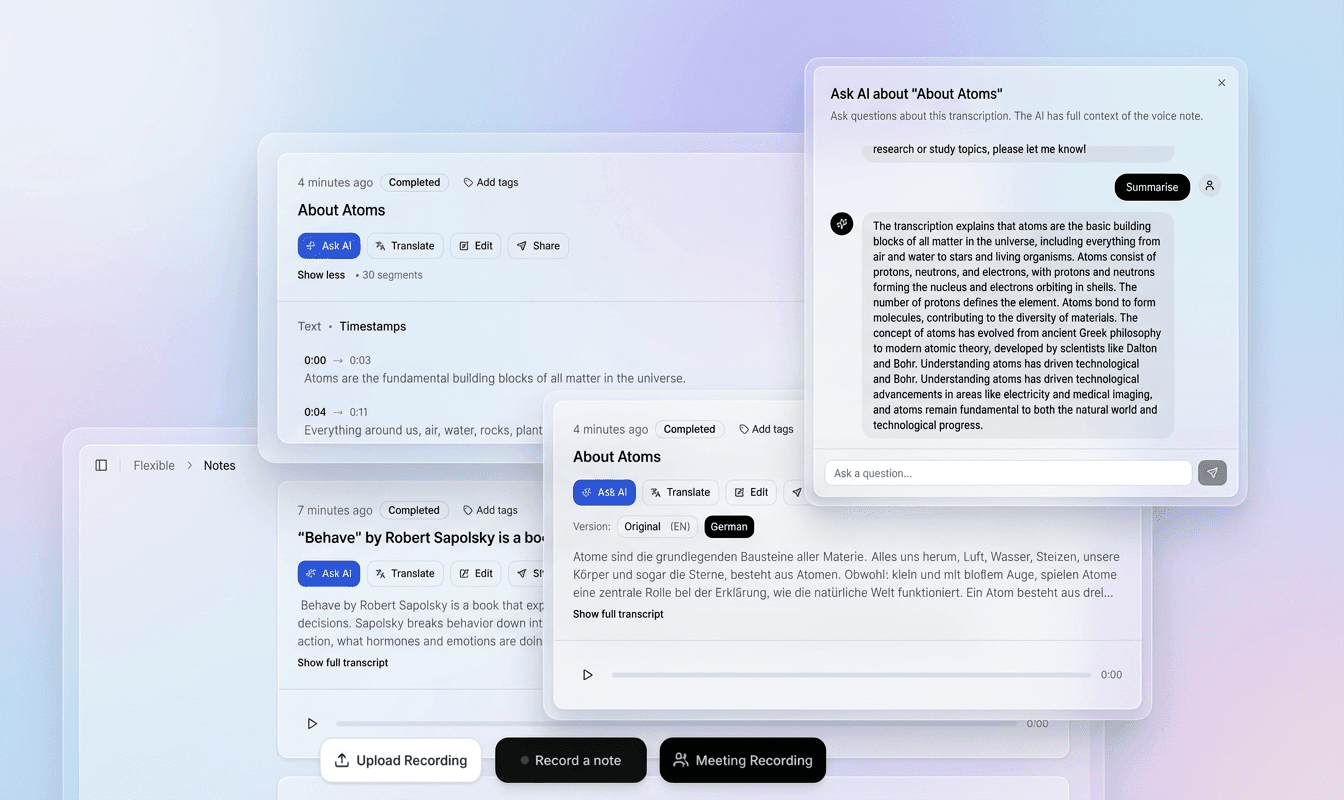
Use the recording and timestamped text together to check names, unfamiliar words and speaker changes in context.
Correct the transcript in the editor, refine segments and prepare a version that fits your document or video.
Export plain text, structured data or subtitle files. Use the transcript for notes, research, captions and follow-up work.
Choose a file above to continue to signup. Your recording stays on your device at this step.
In the app, choose your file again, select its spoken language and model, then start transcription.
Check the draft against your recording, correct the text and timing, then export the format you need.
Regional speech and spelling conventions matter. Identify the variety in your recording and check an excerpt before committing a larger project.
Choose the Azerbaijani script needed for your project and review the spoken variety, names and language changes with the recording. For Azerbaijani (Cyrillic script) recordings, keep the variety and writing convention in your project notes.
Results depend on the recording, selected model and language variety. Review names, specialist terms and unclear passages before sharing or publishing.
Use the Latin, Cyrillic or Arabic-labelled page as appropriate; check the resulting text before sharing it.
Review the speaker’s variety and any Turkish, Persian or Russian passages without silently standardizing them.
Review language-specific Cyrillic letters and names. Check for Latin characters accidentally mixed into Cyrillic words when editing or copying text.
What to listen for when reviewing the first draft.
A Cyrillic transcript should be reviewed against the Azerbaijani convention selected for the project, rather than treated as Russian text.
Practical projects include podcasts, local video subtitles, academic work and oral histories from people familiar with Cyrillic writing.
Replay quiet speech, overlapping voices and unfamiliar names against the source recording. Retain uncertainty notes where needed, and check the exported text or captions before publication.
Practical ways to turn a recording into material you can search, edit and reuse.
Connect oral histories with older Cyrillic letters, books or collection notes.
Prepare reviewed captions for an audience that prefers this script.
Keep audio references and editorial notes when comparing present-day speech with historical written sources.
After transcription and review in the app, choose the output that fits your next step.
Azerbaijani (Azərbaycan dili / Азәрбајҹан дили) is a member of the Oghuz branch of Turkic languages, closely related to Turkish and Turkmen. It serves as the official language of Azerbaijan and is spoken by large communities in Iran, Russia, Georgia, and Turkey. The language has undergone several script reforms: from Perso-Arabic to Latin in the 1920s, then to a modified Cyrillic alphabet in 1939, and back to Latin after independence in 1991. Cyrillic is relevant to older publications and some community archives, including material from Dagestan. For researchers, media producers, and community organizations working with Cyrillic texts, a consistent transcript can connect recordings with existing written sources.
Transcribing spoken Azerbaijani into Cyrillic text enables content to be archived, searched, and repurposed. For example:
A consistent Cyrillic convention helps an archive connect its recordings with older books, letters or collection notes. Keep any spelling modernization documented rather than mixing conventions silently.
Podcasters covering Azerbaijani culture, history, or current events can prepare reviewed Cyrillic transcripts of their recordings. The corrected text can then be posted on a website or used for show notes.
Content creators targeting Azerbaijani speakers in Dagestan or the diaspora can produce Cyrillic subtitles to match their audience’s preferred script.
Linguists studying Turkic dialectology transcribe field recordings from rural Azerbaijan or Iran. Having a Cyrillic output allows them to compare with older Soviet-era written sources.
Community collections can record stories from older residents and keep the audio alongside a corrected Cyrillic transcript. Names and historical references should be checked with the speaker or archive team.
A Cyrillic transcript should be reviewed against the Azerbaijani convention selected for the project, rather than treated as Russian text. Look carefully at letters that resemble Latin characters and at borrowed words whose spelling differs across scripts. When comparing a recording with an older printed source, retain the source spelling in notes if necessary and explain any editorial modernization instead of silently mixing conventions.
Practical details before you start.
No. It records the source language in a chosen writing system. Translation into another language requires a separate step and review.
No. Check the actual draft, especially names and Azerbaijani letter combinations. Keep a consistent project convention before exporting the final version.
Open the Speechyou account flow, sign in or create an account, and upload the recording there. This landing page describes the workflow; it does not process a file directly.
The confirmed choices described here are TXT, SRT, VTT and JSON. Review the downloaded file. Test SRT or VTT in the intended video player and check the caption wording, timing and line breaks.
Review it against the recording first, particularly names, numbers, local wording, script-specific characters and language changes. Keep unresolved passages identifiable rather than substituting a confident guess.
No. A writing-system choice and a translation are different tasks. Check both the spoken language and the script required for the final text.
Review the cyrillic script text and check that it matches your project’s writing convention. Any transliteration or translation should be an explicit editing task; the page name alone is not a guarantee of automatic conversion.
No. Choosing or dropping a file takes you to signup. The landing page does not upload, store or transcribe it. After creating your account, select the file again in the app and choose the spoken language and model.
The app accepts MP3, WAV, AAC, OGG, FLAC and M4A audio, plus MP4, WEBM, MOV, M4V and MPEG/MPG video. The free trial and Solo support files up to 10 GB each. You can extract or trim a short section first to evaluate the result.
In the app, review and edit the transcript before exporting. Use TXT for plain text, SRT for video editors and YouTube, VTT for web captions, or JSON for structured data. Check subtitle timing and line breaks against the original video before publishing.
Create an account to transcribe in the app. Solo includes uploads up to 10 GB per file and $15/month or $67/year billing.
Full access with monthly billing.
Choose the language and writing system that match your recording.
Create your account, upload your file in the app and turn your audio into a transcript you can review.