
Podcasts and documentaries
Prepare corrected transcripts, show notes and captions for recorded Georgian content.
Prepare a transcript draft from Georgian audio or video, then review the text alongside your recording.
An account is required. Choose your file in the app after signing up or signing in.
Continue to Speechyou to upload your Georgian audio or video.
or drop a file here
MP3, WAV, M4A, MP4 and more
Continue to signup. Your file stays on your device; choose it again in the app after creating your account.
No file is uploaded on this page.
Work with your recording after transcription: review the text, find the passage you need and prepare it for the next step.
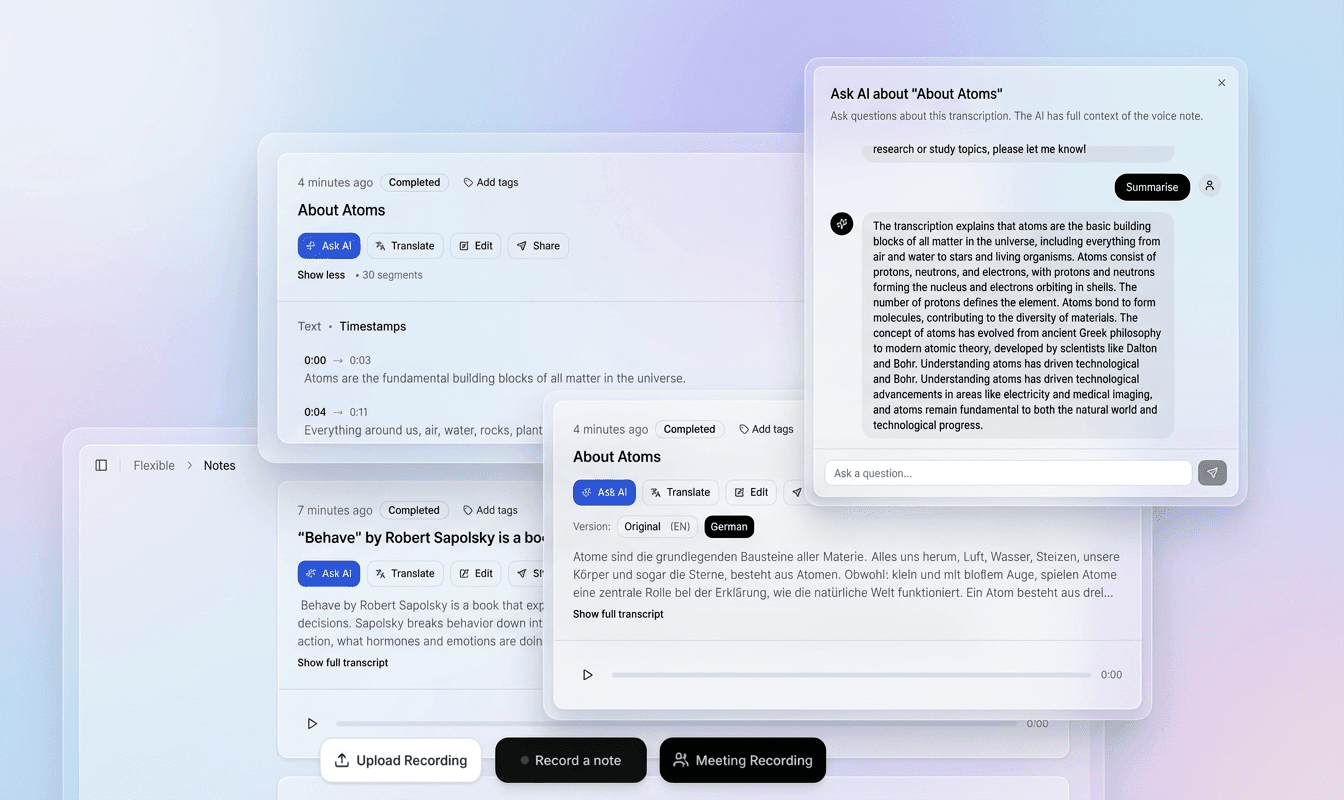
Use the recording and timestamped text together to check names, unfamiliar words and speaker changes in context.
Correct the transcript in the editor, refine segments and prepare a version that fits your document or video.
Export plain text, structured data or subtitle files. Use the transcript for notes, research, captions and follow-up work.
Choose a file above to continue to signup. Your recording stays on your device at this step.
In the app, choose your file again, select its spoken language and model, then start transcription.
Check the draft against your recording, correct the text and timing, then export the format you need.
Speechyou-ს ხელოვნური ინტელექტი ავტომატურად გადააქვს ქართული მეტყველება ტექსტში, ქმნის ტრანსკრიფციას და გენერირებს სუბტიტრებს SRT და VTT ფორმატებში.
Regional speech and spelling conventions matter. Identify the variety in your recording and check an excerpt before committing a larger project.
Prepare Georgian recordings for review in Georgian script, with names and word boundaries checked against the audio.
Results depend on the recording, selected model and language variety. Review names, specialist terms and unclear passages before sharing or publishing.
Check personal names and place names in context rather than relying on familiar Latin transliterations.
Review word boundaries and passages in other languages before using the text in captions or quotations.
Review names and word boundaries against the audio. Keep spelling consistent and check passages that contain another writing system.
What to listen for when reviewing the first draft.
Georgian letters and consonant sequences require close reading in a transcript.
Practical projects include Georgian folklore, community archives, language learning and recorded media.
Replay quiet speech, overlapping voices and unfamiliar names against the source recording. Retain uncertainty notes where needed, and check the exported text or captions before publication.
Practical ways to turn a recording into material you can search, edit and reuse.
Prepare corrected transcripts, show notes and captions for recorded Georgian content.
Keep family or community interviews in audio and text, with names and places checked.
Use a reviewed transcript for reading practice and interviews, adding specialist annotation separately when needed.
After transcription and review in the app, choose the output that fits your next step.
Georgian (ქართული ენა) is the official language of Georgia, a country at the crossroads of Europe and Asia. It is used in Georgia and by diaspora communities in Russia, Turkey, Iran, the European Union, and the United States. Georgian belongs to the Kartvelian language family, which also includes Mingrelian, Svan and Laz. Its unique phonology and script make it a fascinating subject for linguistics and important considerations for reviewing a transcript.
Accurate transcription of Georgian speech is critical for preserving oral history, creating accessible media, and enabling business communication. Georgian consonant sequences, names and word endings deserve careful review against the recording. An unchecked film subtitle can misstate a line, and an interview transcript can misquote a name or number. Review important wording before using the text in publications or teaching materials.
Georgian letters and consonant sequences require close reading in a transcript. Do not use a familiar-looking word as evidence that an unclear passage was recognized correctly. Listen again to names, short words and dense sequences, and ask a fluent reviewer where necessary. A general readable transcript is also different from a phonetic research transcription, which requires specialist annotation.
Practical details before you start.
No. Confirm the spoken language. Mingrelian, Svan, Laz and other languages require their own identification and review.
No. Review the text against the recording and add the phonetic or linguistic annotation your research method requires.
Open the Speechyou account flow, sign in or create an account, and upload the recording there. This landing page describes the workflow; it does not process a file directly.
The confirmed choices described here are TXT, SRT, VTT and JSON. Review the downloaded file. Test SRT or VTT in the intended video player and check the caption wording, timing and line breaks.
Review it against the recording first, particularly names, numbers, local wording, script-specific characters and language changes. Keep unresolved passages identifiable rather than substituting a confident guess.
Keep the writing system required by your project. If you also need Latin transliteration, review that as a separate editorial step.
Review the georgian script text and check that it matches your project’s writing convention. Any transliteration or translation should be an explicit editing task; the page name alone is not a guarantee of automatic conversion.
No. Choosing or dropping a file takes you to signup. The landing page does not upload, store or transcribe it. After creating your account, select the file again in the app and choose the spoken language and model.
The app accepts MP3, WAV, AAC, OGG, FLAC and M4A audio, plus MP4, WEBM, MOV, M4V and MPEG/MPG video. The free trial and Solo support files up to 10 GB each. You can extract or trim a short section first to evaluate the result.
In the app, review and edit the transcript before exporting. Use TXT for plain text, SRT for video editors and YouTube, VTT for web captions, or JSON for structured data. Check subtitle timing and line breaks against the original video before publishing.
Create an account to transcribe in the app. Solo includes uploads up to 10 GB per file and $15/month or $67/year billing.
Full access with monthly billing.
Choose the language and writing system that match your recording.
Create your account, upload your file in the app and turn your audio into a transcript you can review.