Speechyou vs. Plaud AI · Updated October 31, 2026

A Plaud AI alternative.
No extra recorder.

A Plaud AI alternative for people who want to record or upload using the phone or computer they already own. Compare Speechyou with Plaud Note Pro’s US$189 hardware and its optional transcription plans.[14][1]

3-day free trial. Solo: US$67 billed yearly or US$15 monthly.
Annual plans are charged upfront. Renews unless canceled.

Features

app.speechyou.com/demo
12 min ago · 31:42 Meeting Work

Launch planning — final checklist

The team confirmed the release timeline, assigned the remaining launch tasks, and agreed to run one final quality check before publishing.

Play31:42
Speaker 1Speaker 2

Speaker 10:00

Let's use this session to close the final launch items and make sure every owner is clear on the timing.

Speaker 20:08

The product walkthrough is ready. I only need the final captions and the approved release note.

Speaker 10:18

I'll send both this afternoon, then we can complete the quality check tomorrow morning.

Speaker 20:28

Once that passes, the launch page and customer email can go live together at ten.

Interactive Speechyou demo · Illustrative meeting content[19]

No new recorderSpeechyou works with browser/app recording and files you already have[19][20]
US$189 upfrontNote Pro hardware, before an optional paid transcription plan[4][2]
Minutes ≠ creditsPlaud Work usage is separate from the transcription allowance[7]

What changes when you switch?

Plaud combines dedicated recording devices with transcription and AI workflows. Speechyou is worth trying when you already capture usable audio and want recording, uploads, transcript questions and exports without another device purchase. Plaud can be the better fit when its physical controls, separate battery or supported phone-call capture solve a daily recording problem. Its Team plan also offers a hardware-free route with a minimum of two seats.

Current individual plans and explicitly identified product differences
What matters to youSpeechyou SoloPlaud AI
Monthly subscription[14][2][4]US$15 / month for SoloPro: US$17.99/month; recorder purchase is separate
Annual subscription[14][2][4]US$67 billed yearly for Solo (about US$5.58/month)Pro: US$99.99/year; Note Pro + annual Pro is US$288.99 in year one
Transcription allowance[14][1]Unlimited notes on Solo; not a throughput guaranteeStarter: 300 min/month; Pro: 1,200 min/month; unused minutes do not roll over
File size[14][8][4][10]Up to 10 GB per file on Solo and the free trialFile imports supported; per-file byte maximum not established here; 64 GB is Note Pro’s local storage
Free option[14][1][9][8]3-day free trial with all Solo featuresStarter has no subscription charge but individual activation needs a bound device; Team has no free trial
Transcription languages[15][16][1][4]1,700+ languages112+ transcription languages advertised; test your exact language and accent
Accuracy evidence[16][18][4]Whisper + MultiLingual Pro; no controlled head-to-head scoreVendor claims; no controlled same-audio comparison with Speechyou established
Speakers & timestamps[19][16][7][11]Speaker labels and timestamps; behavior varies by modelSpeaker labels, timestamps and default summaries use the transcription workflow
Batch workflow[19][11]Upload multiple recordingsOrdinary exports are per recording; MCP has separate multiple-file retrieval guidance
Transcript questions & summaries[14][19][6][7]Unlimited Chat with AI on Solo and the free trialAsk Plaud Chat and Work; Work uses separate credits, while built-in summaries and Chat do not under the support guide
Subtitle controls[19][11]SRT/VTT exports and detailed segmentation controlsSRT transcript export documented; check actual timing and required subtitle controls
Export formats[19][11]TXT, SRT, VTT, JSONTranscripts: TXT, SRT, DOCX, PDF; summaries also Markdown; audio MP3/WAV
Mobile workflow[20][3][5]iPhone and iPad app; also available on MacPlaud apps with dedicated capture devices; NotePin wearables do not record phone calls
Developer API[17][12]Generally available; create an account and check API usage and billing termsPlaud Embedded offers a device SDK and transcription API with separate developer billing
MCP & external AI[21][13][11]Connect compatible Claude, ChatGPT, Cursor and other clientsDocumented MCP for compatible clients: list recordings, read notes and retrieve transcripts
Organization & collaboration[14][19][10][8]Tags, search, and three Solo workspacesPrivate Cloud Sync archive; Team adds a separate multi-seat workspace purchase
Human transcription service[14][1]AI workflow; human proofreading is not included in SoloAI plans; a human-proofreading service was not established in the reviewed plan documentation
Hardware purchase[19][20][4][3][8]No dedicated recorder required; use your phone or computerNote Pro US$189 upfront; NotePin US$159 / NotePin S US$179; hardware-free Team has a two-seat minimum
Recording methods & calls[19][20][4][3][8]Browser/app microphone recording and uploads; native two-sided phone-call capture not establishedNote Pro supports room and phone-call capture; NotePin wearables capture in person; Team adds Desktop capture/imports
Cloud and device storage[14][10][4]Cloud archive capacity not established here; 10 GB is a per-file upload limitPrivate Cloud Sync described as unlimited; Note Pro’s 64 GB is separate onboard storage
AI task billing[14][17][19][7][6]Unlimited AI chat on the web plan; API billing is separate; not a promise of equivalent Plaud Work automationsWork tasks consume separate credits; Chat and built-in summaries do not under the detailed support guide

“Not verified” describes a limit of this research, not proof that a feature is unavailable. Product, API and human-service capabilities are distinguished. On small screens, scroll the table horizontally.

Compare the recorder and the plan.

A subscription-only comparison leaves out the main purchase decision. Someone buying Note Pro today pays for hardware as well as any paid plan; someone who already owns a device may stay on Starter for no ongoing subscription charge. Compare your recording method, monthly workload and optional AI tasks before calculating a difference.[14][1]

$189 upfront for Plaud Note Pro recorder, plus the subscription below.

Speechyou Solo

For your recordings, notes and AI workflow

$67/ year

USD · billed yearly, upfront[14]

  • Unlimited notes · up to 10 GB per file
  • 1,700+ languages with model options
  • Ask AI, translation and subtitle exports
  • iPhone, iPad and Mac apps; MCP connector
Try Speechyou free

Try Speechyou free for 3 days. API access has separate terms.

Plaud Pro subscription

Transcription subscription; recorder purchased separately

$99.99/ year

USD · billed yearly, upfront[1]

$288.99 in the first year for a new Plaud Note Pro recorder plus 12 months of this plan with annual billing. The device is a one-time purchase; future years exclude it.[4][1]

  • 1,200 transcription minutes / month, not an annual pool
  • Note Pro costs US$189 upfront; Starter is included with activation
  • Unused monthly minutes do not roll over
  • Work uses separate Plaud Credits; no fixed task price established
Verify Plaud AI pricing

These are Pro subscription prices only. A new Note Pro is US$189 upfront: Note Pro plus annual Pro totals US$288.99 in year one before tax, shipping and optional Work credits. Annual Unlimited is US$239.99, making that device-and-plan example US$428.99. An existing device owner within Starter’s 300 monthly minutes can have US$0 ongoing subscription cost. Team has separate per-seat terms and a two-seat minimum. Prices checked October 31, 2026; taxes and currency conversion excluded. Different plans include different features and allowances.

The other Plaud AI options worth comparing

Published options; annual amounts are paid upfront
OptionPrice & allowanceWhen it may fit
Plaud Starter + a deviceIncluded Starter plan; Note Pro hardware US$189 upfront
300 transcription minutes/month; a bound device is required for an individual account
Light use after a recorder purchase. An existing owner within the allowance can have US$0 ongoing plan cost.
Plaud Pro + Note ProUS$17.99/month or US$99.99/year, plus US$189 hardware
1,200 transcription minutes/month; unused monthly minutes do not roll over
A new buyer transcribing up to 20 hours/month: US$288.99 in year one with annual Pro, before tax and optional Work credits.
Plaud Unlimited + Note ProUS$239.99/year plus US$189 hardware
Up to 24 transcription hours/day; Work credit consumption remains separate
Higher transcription volume. The device plus annual plan totals US$428.99 in year one; do not treat Work tasks as included unlimited usage.
NotePin / NotePin SUS$159 / US$179 hardware; individual plans sold separately
Wearable in-person recording; not the Note Pro phone-call mode
People who value wearable capture. With annual Pro, the respective first-year device-and-plan examples are US$258.99 and US$278.99.
Plaud Team without a recorderSeparate Team terms; minimum two seats
Hardware-free Desktop capture and imports; no free Team trial
A team evaluating a shared workspace. Do not compare a two-seat commitment with a single-person subscription as equivalent entitlements.

Plan and service figures from the sources below. Illustrative per-file totals are arithmetic examples, not measured customer savings.[1]

Find your language. Try your audio.

Plaud advertises transcription in 112+ languages. Speechyou advertises 1,700+ language support through its broader language-and-script catalog. Our catalog review counted 1,668 configurations across 1,648 distinct language codes. These counts use different conventions: multiple scripts can belong to the same language, and a selectable option is not an independent accuracy result. The practical advantage to investigate is whether the language and writing system in your own recordings are available.[1][15][16]

Start with the exact spoken language, script, accents and terminology you need. Test the same difficult sample in both products, including names, numbers and switches between languages. Check transcription separately from translation and summaries. A broad translation menu cannot establish that the underlying speech was recognized correctly, and neither vendor’s catalog guarantees equal quality in every language.[15][16][4]

Browse all Speechyou languages

Find the right starting point

Speechyou offers Whisper and MultiLingual Pro. Check the catalog for your exact language and script, then test a recording.

These are Speechyou language examples, not a claim that Plaud AI lacks all four. Language availability is not an accuracy guarantee.[15][16]

Bring your toughest recording.

Use the same audio in both tools. The names, numbers and speaker changes you need are a better test than a headline percentage.

  1. Bring a real recording

    Start your free trial and upload a representative interview, lecture or video. Choose the correct language in both products.

  2. Check what matters

    Listen to difficult passages. Check names, figures, quotations and speaker labels, then note the time needed to correct them.

  3. Try the next step

    Ask for a summary and verify it. Export the file you actually need and open it in your usual software before deciding.

Try your own audio free

Try Speechyou free for 3 days.

A fair test compares the actual products.

We have not run a controlled Speechyou-versus-Plaud accuracy benchmark or hands-on microphone and battery tests for this page. Compare a shared source recording to evaluate transcription, then test your real capture setup separately. A dedicated recorder’s microphone placement and separate battery can improve whether you obtain useful audio, without proving that its recognition model is more accurate. Check quotations, speaker attribution, numbers and correction time rather than comparing headline language counts or vendor percentages.[4][1][16]

How to run a useful comparison

Keep the source file and language consistent. Record the model and processing mode where available. Compare important factual errors, speaker attribution, timestamps and time spent editing. If you calculate word error rate, use the same manually checked reference transcript. Keep translation, summarization and human proofreading separate from the raw transcription result.

Whisper research describes a model family and its limitations. It is not a score for either hosted product. We have not established a controlled head-to-head benchmark for this page.[18][16]

Your transcript is just the start.

Compare what happens after the words appear: finding a quote, asking a question, sharing a note, or delivering the right file.

Choose how you will capture the conversation

Speechyou lets you start from browser/app recording or an existing audio or video file. Note Pro adds dedicated physical capture and a supported phone-call recording mode; NotePin and NotePin S offer wearable in-person capture. Those are different requirements. Recording microphone audio in a general app does not automatically record both sides of a phone call. If you already capture usable audio, a new recorder may not improve the transcription-to-export work you actually want to change. If physical controls and a separate recording battery prevent missed conversations, Plaud can remain the stronger fit.[19][20][4][3]

Try the browser voice recorder

Separate transcript questions from agent tasks

Speechyou includes transcript questions, summaries and action items in its individual app workflow. Plaud’s October 29 Intelligence launch expands Ask Plaud into Chat and Work, with Routines, connectors and Memory. Work can create outputs and perform tasks, so replacing it may require more than a transcript editor. The detailed billing guide says built-in Re-summarize, template summaries and Chat do not consume credits; Work tasks do. Evaluate the actual task, connected service and billing rules rather than treating every AI feature as the same entitlement.[14][19][6][7]

Explore recording-to-meeting-notes workflows

Test the export and the connected assistant

Speechyou exports TXT, SRT, VTT and JSON and connects notes to compatible MCP clients. Plaud documents TXT, SRT, DOCX and PDF transcript exports, with Markdown available for summaries and MP3/WAV for audio. Both products have MCP connections: Plaud’s documented tools list recordings and retrieve notes or transcripts. Its export guidance describes multiple-file retrieval through MCP, while ordinary exports operate one recording at a time. Test the required content type, timing and client permissions before moving an archive. A document export or a connector logo alone does not establish that your complete workflow will transfer unchanged.[19][21][11][13]

See Speechyou’s MCP connector

Take Speechyou on the go

Record an idea between appointments, transcribe an interview and share a summary from your phone. Speechyou is available on iPhone and iPad, with a Mac app too. Check the comparison table for Plaud AI’s mobile options; compare recording, editing and export options on the devices you use.[20]

Explore the mobile app

Bring your bigger recordings

Speechyou Solo supports files up to 10 GB. Batch-upload recordings, organize them with tags and search, and keep the transcript alongside your notes. File size is separate from duration, storage and processing speed. Check the sourced competitor limits in the table before making a large-file decision.[14][19]

Transcribe your recordings

Build around your integration

Speechyou API is generally available. Create an account to get started, then check current API usage and billing terms. The table distinguishes Plaud AI’s developer offering from its web subscription.[17]

Create an account

Real screens. Clear context.

Browser captures of the public product pages reviewed. Scroll inside a long capture or open it at full size; each image links back to its source.

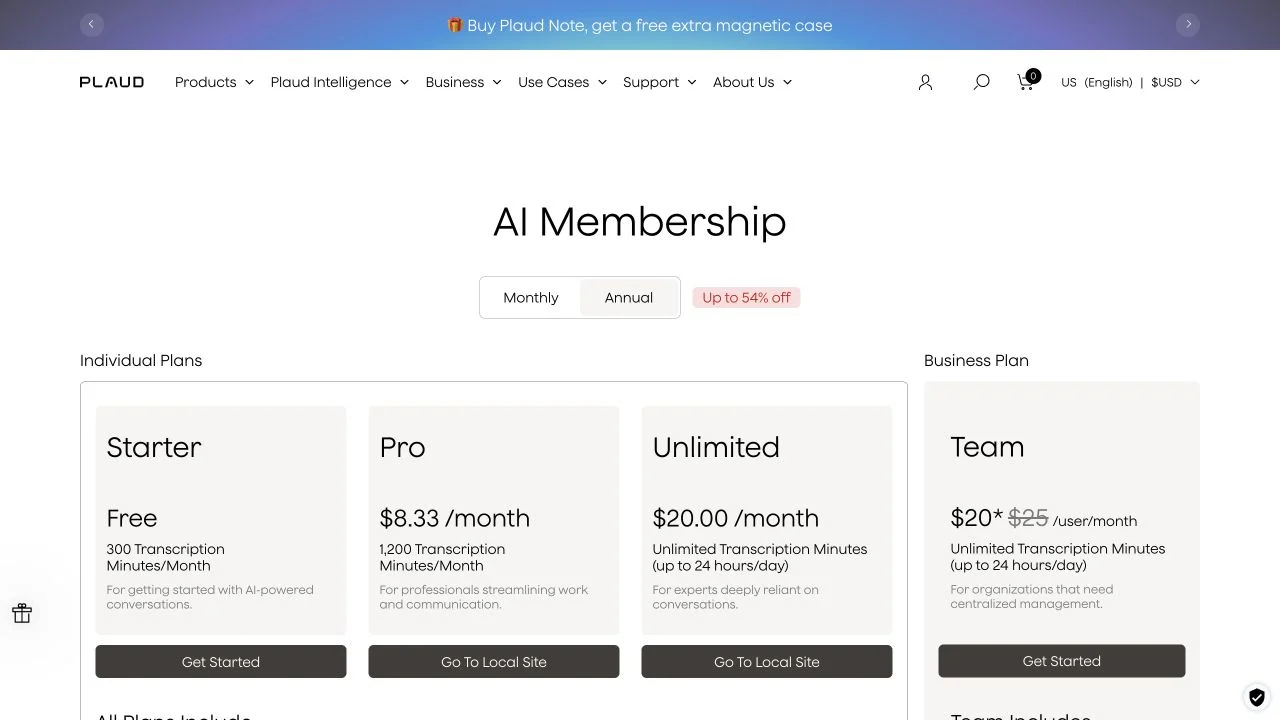
Official Plaud pricing selector showing Starter, Pro, Unlimited and Team annual plan options

Plaud’s annual selector captured October 31, 2026. Displayed monthly equivalents require annual billing, and recorder hardware and Work credits are separate purchase considerations.

View full captureOriginal sourceCaptured October 31, 2026

A useful comparison shows both sides.

Choose Speechyou when…

  • Your phone or computer already captures usable audio and you want recording, uploads, questions and exports without another recorder purchase.
  • Your exact language or script is outside Plaud’s published set and you want to test Speechyou’s broader catalog.
  • You need TXT, SRT, VTT or JSON output and a workflow with your compatible AI assistant.
  • You are buying for individual transcription use and prefer to evaluate that workflow without a dedicated device or a two-seat Team commitment.
Try Speechyou free

Consider Plaud AI when…

  • Dedicated physical controls, a separate recording battery or supported Note Pro phone-call capture solve a recurring recording problem.
  • Wearable in-person capture matters more than avoiding an additional device.
  • You already own a Plaud recorder and Starter’s 300 minutes/month are enough, making ongoing subscription cost US$0.
  • You depend on specific Plaud Work routines, connectors or a shared Team workspace and have checked their current entitlements and credit costs.
Check the supporting sources

The details behind the table.

Billing models, usage rules and production requirements can matter more than a feature count.

What changed with Plaud Intelligence in October 2026?

The October 29 launch introduces Ask Plaud Chat and Work, agent Routines, connectors and editable Memory through a phased rollout. Named connections include Slack, Notion, Google Calendar, Linear and Zapier; some listings are marked Preview. An alternative should therefore be evaluated against the part you use: capture, transcription, retrieval, generated documents or connected actions. Do not assume every account has identical access during rollout or that a transcription subscription reproduces every Work automation.[6][7]

Do ordinary summaries use Plaud Credits?

The launch announcement describes re-summarizing among chargeable actions, but the more specific credits support guide says built-in Re-summarize, template summaries and Chat do not consume credits. It separates transcription, speaker labels, default summaries and automatic action items from Work tasks. We follow the detailed support guide for the built-in feature and disclose the discrepancy. Trial credits do not replenish monthly; exhausting them pauses Work rather than the underlying transcription plan. No fixed price per task was established, so we do not invent a monthly Work budget.[6][7]

Does Plaud always require a physical recorder?

No. Current Team documentation allows hardware-free Desktop capture and file imports, with a minimum of two seats and no free Team trial. The individual Starter/Desktop workflow requires a bound device. Keep those offers separate: someone buying one Note Pro, an existing Starter user and a team purchasing multiple seats have different starting costs and entitlements. Speechyou’s hardware-free individual recording/upload route should not be presented as a capability that no Plaud plan offers.[8][9][19][20]

How do storage, file size and offline capture differ?

Note Pro’s 64 GB is onboard audio storage. Plaud describes Private Cloud Sync as an unlimited cloud archive; that is separate from monthly transcription minutes and per-file import limits. Speechyou’s up-to-10-GB figure describes one file, not a published unlimited cloud archive. A per-file Plaud byte maximum was not established in the sources reviewed, which is an unanswered purchasing question rather than evidence of unlimited imports. Recording audio offline also does not establish offline transcription: hardware can save audio locally and still depend on cloud processing afterward.[4][10][14]

What is a fair first-year cost comparison?

Use the device purchase plus the required subscription and any necessary usage or credit purchases. A new Note Pro plus annual Pro is US$189 + US$99.99 = US$288.99 before tax, shipping and Work credits, for up to 20 transcription hours each month. Note Pro plus annual Unlimited is US$428.99. These are arithmetic examples, not advertised bundles or measured customer savings. An existing owner within Starter’s five monthly hours can instead have no recurring plan bill. Include replacement hardware only when you actually expect it, and verify your displayed Speechyou offer rather than assuming the same savings for every buyer.[4][2][1][14]

How should you move useful recordings?

Export original audio as well as any edited transcript and summary you need. Plaud’s transcript, summary and audio formats differ, and its ordinary export workflow handles one recording at a time. Test a few representative originals in Speechyou, confirm the exact language, check speaker labels and timing, and open the final export in your usual tools. Keep an independent copy before changing plans. A one-click transfer of all folders, edits, comments, speaker identities and permissions has not been verified, and transcript migration does not replace testing the capture method itself.[11][19][14]

Your questions, answered.

Can I use a Plaud AI alternative without buying a recorder?

Yes. Speechyou supports browser/app recording and uploads using equipment you already own. Plaud also offers a hardware-free Team route through Desktop capture and imports, with a minimum of two seats and no free Team trial. Individual Plaud Starter activation still requires a bound device. Compare the account type as well as the recording method.[19][20][8][9]

How much does Plaud Note Pro cost with a transcription plan?

Note Pro is US$189 upfront. Starter is included and provides 300 transcription minutes/month. Pro costs US$17.99 monthly or US$99.99 yearly for 1,200 minutes/month, so a new device with annual Pro totals US$288.99 in year one. Annual Unlimited is US$239.99, making that device-and-plan example US$428.99. Taxes, shipping, regional offers and optional Work credits are separate.[4][2][1][7]

Is NotePin a cheaper Plaud Note Pro alternative for calls?

Original NotePin and NotePin S cost US$159 and US$179 at the reviewed regular US prices, but they are wearable in-person recorders. They do not provide Note Pro’s phone-call mode. Choose the recording method before comparing the device price; an app that records microphone audio also cannot be assumed to capture both sides of a phone call.[3][5][4]

Does Plaud now charge credits for every summary?

The detailed support guide says default summaries, built-in Re-summarize, template summaries and Chat do not consume Plaud Credits. Work tasks use separate credits, while transcription minutes apply to the underlying transcription workflow. The launch announcement describes re-summarizing differently, so check current in-app rules and distinguish the built-in feature from a Work task.[7][6]

When should I keep Plaud instead of switching?

Keep it on your shortlist when physical recording controls, wearable capture, a separate recording battery or supported Note Pro call recording are central to your workflow. An existing owner within Starter’s allowance may have no ongoing plan cost. Existing Work routines and Team requirements also deserve a separate evaluation. Try Speechyou when your current equipment captures usable audio and your main need is individual transcription, language selection, transcript questions and exports.[3][4][1][6][8][19]

Is Speechyou more accurate than Plaud AI?

We have not established that in a controlled product comparison. Use the same recording and language in both tools, check names, numbers and speaker changes against the audio, and measure correction time. Model research and vendor accuracy percentages are not a substitute for this test.[18][16]

What does 1,700+ languages mean?

It is a rounded catalog figure. The application catalog reviewed contains 1,668 language/script configurations across 1,648 distinct language codes. Multiple scripts can belong to one language. Speechyou also supports translation into 1,700 languages. Coverage does not imply equal accuracy in every language.[15][16]

Can I try my own recording for free?

Try all Solo features free for 3 days, including 10 GB file uploads and unlimited chat with AI.[14][19]

Can I use Speechyou on my phone and with my AI assistant?

Speechyou is available on iPhone, iPad and Mac. Its MCP connector lets compatible AI clients search and read your notes and transcripts. Claude, ChatGPT, Cursor and other clients require their own supported connector setup; availability can depend on the client and its plan.[20][21]

Can I move all my Plaud AI files to Speechyou?

Keep your original recordings and export any edited transcripts you need before leaving your existing service. Upload supported recordings to Speechyou within its plan limits. A one-click transfer of folders, edits, comments, permissions and speaker identities has not been verified. Test a few representative files before moving a library.[19][14]

A comparison you can check.

Published by Speechyou, a Plaud AI competitor. Reviewed October 31, 2026. We checked public product and pricing pages, help articles and browser-visible plan selectors. Speechyou capabilities also draw on the product configuration and owner-confirmed offer used for this comparison. We did not test a paid Plaud AI account or run a controlled transcription benchmark.

Prices keep their stated currencies and billing periods. Annual totals calculated from monthly equivalents are labeled. Vendor claims, documentation differences and unverified capabilities are identified. Screenshots show public pages; the Speechyou demo contains sample content. Features and prices can change.

View all 21 sources
  1. Plaud — AI plan pricing and allowance matrix

    Individual Starter, Pro and Unlimited allowances, annual billing selector and Team comparison. Starter provides 300 minutes/month; Pro provides 1,200 minutes/month. The annual selector displays monthly equivalents rather than a monthly cancellation price.

  2. Plaud — Membership prices

    US pricing reviewed: Pro US$17.99 monthly or US$99.99 annually; Unlimited US$239.99 annually. Subscription prices exclude a separately purchased recorder and optional Work credits. Checkout and regional offers can differ.

  3. Plaud — AI recording device comparison

    Regular reviewed device prices: Note Pro US$189, original NotePin US$159 and NotePin S US$179. NotePin wearables target in-person capture, not Note Pro’s phone-call recording mode. Plaud One was listed separately as an Explorer Edition pre-order.

  4. Plaud — Note Pro specifications

    US$189 device with in-person/phone-call capture, physical controls, 64 GB onboard storage and up to 50 hours of advertised recording endurance in Endurance mode. Battery and microphone specifications are vendor claims, not our measurements.

  5. Plaud — NotePin wearable recorder

    Wearable in-person recording. Compare the current device matrix for original NotePin versus NotePin S, prices and included accessories; neither should be assumed to replace Note Pro’s call-capture workflow.

  6. Plaud — October 29, 2026 Intelligence announcement

    Announces phased availability of Ask Plaud Chat and Work, Routines, connectors, Memory and a credits system. Its description of re-summarizing differs from the more specific credits support guide; we identify that discrepancy rather than treating all summaries as chargeable Work tasks.

  7. Plaud Help — What are Plaud Credits?

    Separates transcription minutes from Work credits. Built-in Re-summarize, template summaries and Chat do not consume credits under this guide; Work tasks do. Trial credits do not replenish monthly. No fixed dollar cost for every Work task is established.

  8. Plaud Help — Team for v4.0.x or later

    Team can be used without a recorder through Desktop capture and imports. A minimum of two seats is required and no free Team trial is offered. Device and capture requirements differ from an individual Starter account.

  9. Plaud Help — Device binding on Desktop

    Documents the bound-device requirement for the individual Desktop workflow. Do not generalize this requirement to the newer hardware-free Team option.

  10. Plaud Help — Private Cloud Sync

    Describes an unlimited cloud archive through Private Cloud Sync. This is separate from the recorder’s 64 GB local storage, monthly transcription minutes and any per-file import limits.

  11. Plaud Help — Export transcripts, notes and audio for v4

    Lists TXT, SRT, DOCX and PDF transcript exports; summaries can also use Markdown and audio exports include MP3/WAV. Ordinary exports work one recording at a time, with separate guidance for multiple-file retrieval through MCP. Export formats differ by content type.

  12. Plaud Embedded — Device SDK and Transcription API

    Documents a device SDK and transcription API for application builders. Embedded usage and connected-device billing are separate from Plaud app subscriptions; compare developer terms rather than treating a consumer plan as an API bundle.

  13. Plaud Dev — MCP setup and available tools

    Documents supported clients including Claude, Cursor, ChatGPT and Codex, account authorization, recording listing, note retrieval and transcripts with timestamps and speaker labels. Client setup and data-routing requirements apply.

  14. Speechyou — Solo pricing

    $15 monthly / $67 annually; cross-checked against the app’s plan and onboarding configuration.

  15. Speechyou — Transcription language catalog

    Browse language and script options. The rounded 1,700 claim describes catalog breadth, not equal accuracy.

  16. Speechyou — Beyond Whisper: MultiLingual Pro

    Model choice, language/script distinctions, and evaluation limitations; cross-checked with application code.

  17. Speechyou — Speech-to-text API

    Generally available. Create an account to get started and check current API usage and billing terms.

  18. OpenAI — Whisper repository and evaluation

    Model-family documentation and language-dependent performance. Not a test of either hosted product.

  19. Speechyou — Public product demo

    Screenshot of the public demo with illustrative meeting content, captured September 13, 2026.

  20. Speechyou — Speechyou mobile app

    Record, transcribe, summarize, and share on iPhone and iPad; also available on Mac.

  21. Speechyou — MCP connector for your notes

    Connect notes to Claude, ChatGPT, Cursor, and other MCP-compatible clients. Client setup and plan requirements apply.

Found a change? Send a correction.

Find your next transcription workflow.

Compare another transcription tool

Your own audio is the real test.

Bring one recording. Check the transcript, ask a question, and see if it fits your workflow.

Try AI transcription without buying a separate recorder

Try Speechyou free for 3 days.

Plaud AI is a trademark of its owner. No affiliation or endorsement.