
Oral histories
Preserve interviews and family accounts with the audio, corrected transcript and contextual notes kept together.
Prepare a transcript draft from Armenian audio or video, then review the text alongside your recording.
An account is required. Choose your file in the app after signing up or signing in.
Continue to Speechyou to upload your Armenian audio or video.
or drop a file here
MP3, WAV, M4A, MP4 and more
Continue to signup. Your file stays on your device; choose it again in the app after creating your account.
No file is uploaded on this page.
Work with your recording after transcription: review the text, find the passage you need and prepare it for the next step.
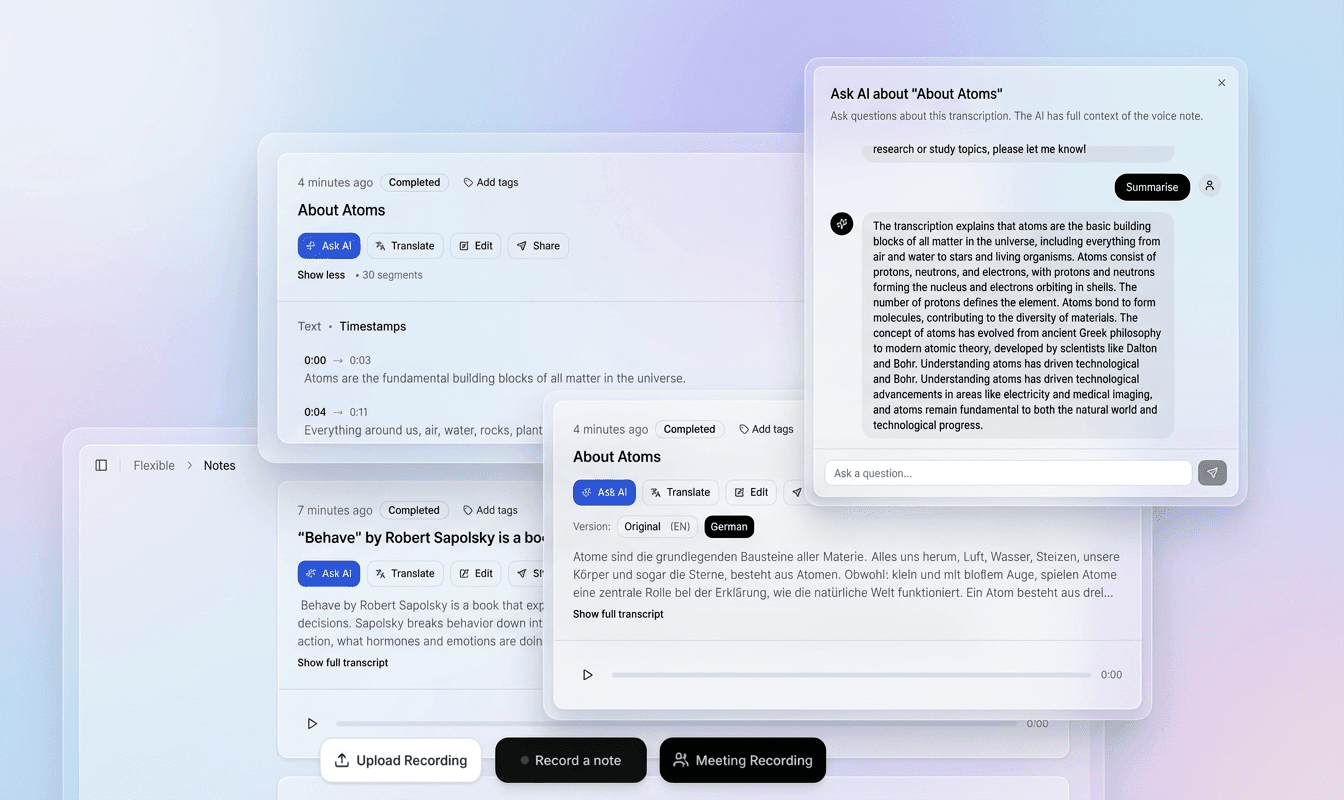
Use the recording and timestamped text together to check names, unfamiliar words and speaker changes in context.
Correct the transcript in the editor, refine segments and prepare a version that fits your document or video.
Export plain text, structured data or subtitle files. Use the transcript for notes, research, captions and follow-up work.
Choose a file above to continue to signup. Your recording stays on your device at this step.
In the app, choose your file again, select its spoken language and model, then start transcription.
Check the draft against your recording, correct the text and timing, then export the format you need.
Speechyou-ը թույլ է տալիս հայերեն խոսքը վերածել տեքստի:
Regional speech and spelling conventions matter. Identify the variety in your recording and check an excerpt before committing a larger project.
Choose the Armenian variety in your recording and review Armenian-script text with attention to names and the project’s spelling conventions. For Armenian recordings, keep the variety and writing convention in your project notes.
Results depend on the recording, selected model and language variety. Review names, specialist terms and unclear passages before sharing or publishing.
Use the Western Armenian page when that fits the recording; keep the speaker’s variety in the project notes.
Check Armenian names, punctuation and spelling conventions before adapting the transcript for publication.
Review Armenian spelling and punctuation in context. Keep the project’s convention consistent when names also appear in Latin script.
What to listen for when reviewing the first draft.
Decide whether the project follows reformed or traditional Armenian spelling before editing.
Useful recording projects include oral histories, cultural podcasts, academic interviews and language learning.
Replay quiet speech, overlapping voices and unfamiliar names against the source recording. Retain uncertainty notes where needed, and check the exported text or captions before publication.
Practical ways to turn a recording into material you can search, edit and reuse.
Preserve interviews and family accounts with the audio, corrected transcript and contextual notes kept together.
Prepare searchable show notes and reviewed Armenian captions for recorded cultural or educational media.
Use a corrected transcript beside the recording for interviews, listening practice and teaching materials.
After transcription and review in the app, choose the output that fits your next step.
Armenian (Հայերեն) is a unique branch of the Indo-European language family with its own alphabet and a long written history. Today, it is used in Armenia and the diaspora — from Los Angeles to Beirut to Marseille. The language exists in two main standards: Eastern Armenian, the official language of the Republic of Armenia, and Western Armenian, spoken by descendants of Ottoman Armenians. Additionally, numerous regional dialects like Hamshen (Homshetsi) and Karabakh add further variety. For an Armenian transcription project, establish the speaker’s variety and the audience’s spelling expectations.
In a world where video content dominates, having Armenian subtitle generation is critical for media producers, educators, and archivists. Diaspora communities rely on YouTube and podcasts to stay connected to their heritage, but without captions, much of this content remains inaccessible to the deaf and hard of hearing or non-native speakers. Moreover, oral history projects — especially those documenting the Armenian Genocide — require Armenian audio to text conversion to preserve testimonies in searchable, translatable formats. A project should agree whether its final text follows traditional or reformed spelling, and whether local forms are preserved. Review names, borrowed words and unclear consonant distinctions with a reader familiar with the speaker’s variety.
Decide whether the project follows reformed or traditional Armenian spelling before editing. Consonant distinctions and their pronunciation vary between Armenian varieties; a short, unclear sound should be checked against the recording rather than resolved through a confident guess. Review personal names, place names, quotations and borrowed words carefully. A familiar spelling from one community may not be the editorial choice used by another.
Practical details before you start.
Choose the convention that matches your readers and project. Review spelling with someone familiar with the speaker’s variety; the page does not establish equal recognition quality across varieties.
Listen to each language change, check names and quoted material, and keep a separate translation if one is needed. Do not replace unclear Armenian words with plausible words from the other language.
Open the Speechyou account flow, sign in or create an account, and upload the recording there. This landing page describes the workflow; it does not process a file directly.
The confirmed choices described here are TXT, SRT, VTT and JSON. Review the downloaded file. Test SRT or VTT in the intended video player and check the caption wording, timing and line breaks.
Review it against the recording first, particularly names, numbers, local wording, script-specific characters and language changes. Keep unresolved passages identifiable rather than substituting a confident guess.
No. Choose the relevant variety and review a representative section of the recording before planning a larger project.
Review the armenian script text and check that it matches your project’s writing convention. Any transliteration or translation should be an explicit editing task; the page name alone is not a guarantee of automatic conversion.
No. Choosing or dropping a file takes you to signup. The landing page does not upload, store or transcribe it. After creating your account, select the file again in the app and choose the spoken language and model.
The app accepts MP3, WAV, AAC, OGG, FLAC and M4A audio, plus MP4, WEBM, MOV, M4V and MPEG/MPG video. The free trial and Solo support files up to 10 GB each. You can extract or trim a short section first to evaluate the result.
In the app, review and edit the transcript before exporting. Use TXT for plain text, SRT for video editors and YouTube, VTT for web captions, or JSON for structured data. Check subtitle timing and line breaks against the original video before publishing.
Create an account to transcribe in the app. Solo includes uploads up to 10 GB per file and $15/month or $67/year billing.
Full access with monthly billing.
Choose the language and writing system that match your recording.
Create your account, upload your file in the app and turn your audio into a transcript you can review.