
Oral History Preservation
Speechyou converts Votic oral narratives into searchable text, helping linguists and communities archive the language.
Prepare a transcript draft from Votic (Latin script) audio or video, then review the text alongside your recording.
An account is required. Choose your file in the app after signing up or signing in.
Continue to Speechyou to upload your Votic audio or video.
or drop a file here
MP3, WAV, M4A, MP4 and more
Continue to signup. Your file stays on your device; choose it again in the app after creating your account.
No file is uploaded on this page.
Work with your recording after transcription: review the text, find the passage you need and prepare it for the next step.
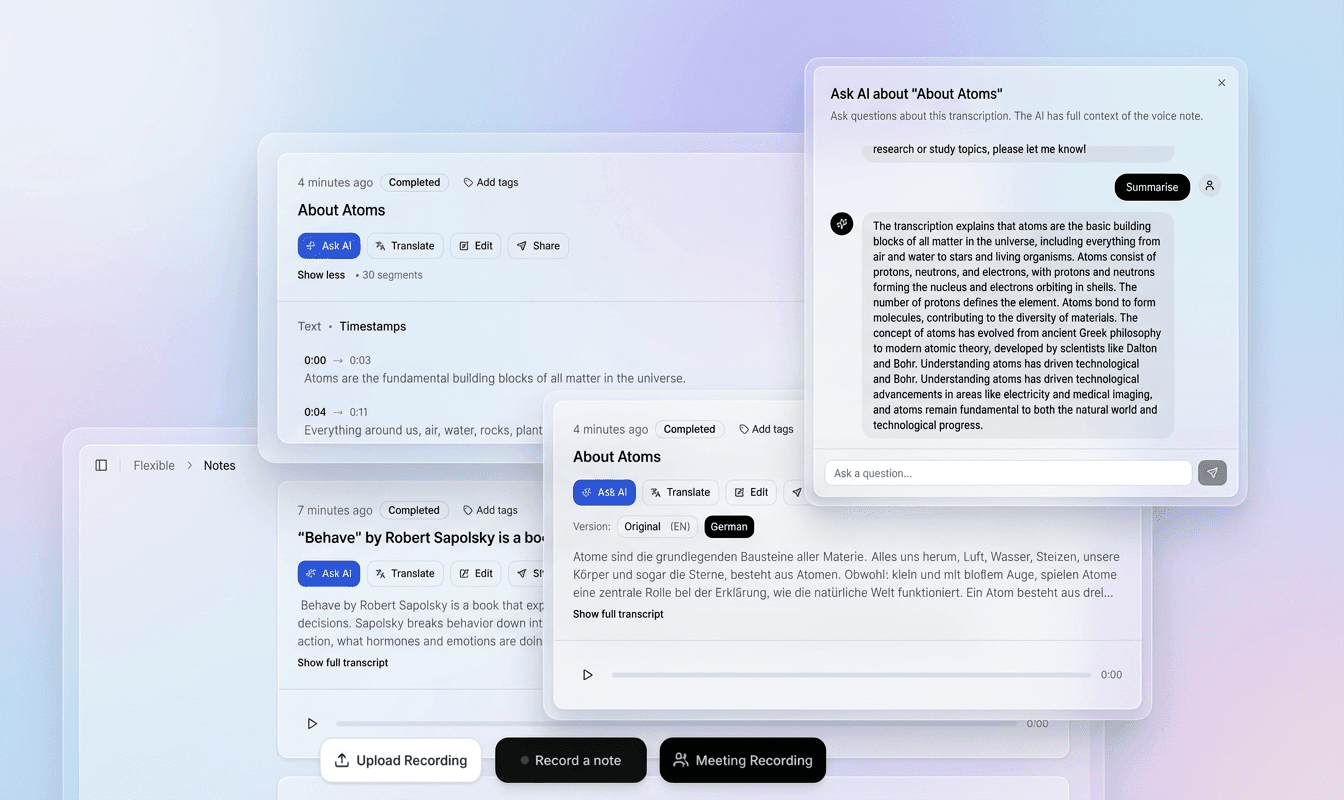
Use the recording and timestamped text together to check names, unfamiliar words and speaker changes in context.
Correct the transcript in the editor, refine segments and prepare a version that fits your document or video.
Export plain text, structured data or subtitle files. Use the transcript for notes, research, captions and follow-up work.
Choose a file above to continue to signup. Your recording stays on your device at this step.
In the app, choose your file again, select its spoken language and model, then start transcription.
Check the draft against your recording, correct the text and timing, then export the format you need.
Regional speech and spelling conventions matter. Identify the variety in your recording and check an excerpt before committing a larger project.
Prepare Votic recordings for close review with the spoken variety and final spelling requirements documented.
Results depend on the recording, selected model and language variety. Review names, specialist terms and unclear passages before sharing or publishing.
Keep Votic distinct from neighbouring languages when choosing and labelling the recording.
Check unfamiliar forms against the audio and the spelling sources agreed for your project.
Review accents and language-specific letters. Check that similar-looking Cyrillic characters have not entered Latin words when editing or copying text.
What to listen for when reviewing the first draft.
Votic distinguishes palatalized and non-palatalized consonants, e.g., /t/ vs /tʲ/. Listen to a representative section before processing a long Votic recording. Background voices, music and distortion can obscure words; keep uncertain passages marked for review and compare them with the original audio.
Votic has a complex vowel harmony system where suffixes change vowels based on the root. Keep Votic distinct from neighbouring languages when choosing and labelling the recording. Check unfamiliar forms against the audio and the spelling sources agreed for your project.
With only a few dozen fluent speakers, Votic has minimal transcribed data. Keep Votic distinct from neighbouring languages when choosing and labelling the recording. Check unfamiliar forms against the audio and the spelling sources agreed for your project.
Practical ways to turn a recording into material you can search, edit and reuse.
Speechyou converts Votic oral narratives into searchable text, helping linguists and communities archive the language.
Add accurate Votic or bilingual subtitles to traditional songs, poems, and folk tales. Share on YouTube or social media to promote the language.
Create transcription and subtitles for Votic lesson recordings. Learners can read along with precise text to master pronunciation and vocabulary.
Transcribe field recordings for phonetic and morphological studies. Speechyou's time-aligned output supports detailed linguistic analysis.
Produce SRT and VTT subtitles for documentaries about Ingrian culture and the Votic people. Reach a wider audience with accurate captions.
Generate closed captions for any Votic audio or video content, helping deaf and hard-of-hearing community members can access the language's media.
After transcription and review in the app, choose the output that fits your next step.
Votic (vaďďa tšeeli) is a Finnic language spoken historically along the Gulf of Finland coast and around the Luga River in what is now the Leningrad Oblast of Russia. It belongs to the same language family as Finnish, Estonian, and Ingrian. Today, Votic is one of the most endangered languages in Europe, with only a handful of native speakers left. The language is kept alive through community efforts, documentation projects, and digital tools that help record and share it.
Language documentation is a race against time. Transcribing Votic audio by hand is slow and prone to inconsistency, especially with the language's intricate phonology. Accurate speech-to-text allows linguists, community members, and educators to quickly convert hours of recordings into searchable text. This text can then be used for:
Reliable transcription also helps build a digital presence for Votic, increasing its visibility on the internet and making it accessible to a global audience interested in cultural diversity.
Votic presents several challenges for automatic speech recognition:
Votic folklore is exceptionally rich: runo songs, incantations, and proverbs. Check Votic spelling against the recording and the writing convention used by your project. Review names, diacritics and unfamiliar word forms before exporting; a page’s script label does not replace checking the actual written output. This cuts project timelines from months to weeks.
Teachers of Votic as a second language rely on transcripts of native speech. Speechyou generates synchronized text that students can follow while listening, improving comprehension and pronunciation.
Institutions like the Museum of the Peoples of Ingria upload Votic audio to their websites. With SRT subtitles generated by Speechyou, visitors can read along even if they do not speak the language, fostering public appreciation.
For deaf or hard-of-hearing members of the Votic community, captions on video content are the only way to experience spoken Votic. Speechyou’s VTT and SRT output supports accessibility after review.
A practical review workflow includes:
Community contributions help us improve accuracy with each update.
Votic is more than a language—it is a living memory of a people. Whether you are a linguist, a language activist, or a curious learner, our tool empowers you to transcribe, subtitle, and share Votic content with an online editing workflow.
Practical details before you start.
Listen to a representative section before processing a long Votic recording. Background voices, music and distortion can obscure words; keep uncertain passages marked for review and compare them with the original audio. Keep Votic distinct from neighbouring languages when choosing and labelling the recording.
Regional Votic pronunciation and vocabulary need review in their own context. When working with Western Votic, Eastern Votic, Lower Luga Votic, keep the speaker’s wording and check unfamiliar forms with a fluent reviewer. Start with a short representative sample before processing an archive, and do not assume identical recognition quality across varieties.
You can upload recordings with transcripts through our 'Improve Model' feature. We use anonymous data to refine the Votic language pack, and contributors receive free transcription minutes.
After uploading and reviewing your Votic recording in the app, export SRT or VTT subtitles. Preview the file with your video and check names, line breaks and timing before publishing. TXT and JSON are also available for transcript workflows.
Check Votic spelling against the recording and the writing convention used by your project. Review names, diacritics and unfamiliar word forms before exporting; a page’s script label does not replace checking the actual written output. Keep Votic distinct from neighbouring languages when choosing and labelling the recording.
Keep the speaker, locality, recording date when known and intended spelling convention with the file so uncertain forms can be checked in context.
Review the latin script text and check that it matches your project’s writing convention. Any transliteration or translation should be an explicit editing task; the page name alone is not a guarantee of automatic conversion.
No. Choosing or dropping a file takes you to signup. The landing page does not upload, store or transcribe it. After creating your account, select the file again in the app and choose the spoken language and model.
The app accepts MP3, WAV, AAC, OGG, FLAC and M4A audio, plus MP4, WEBM, MOV, M4V and MPEG/MPG video. The free trial and Solo support files up to 10 GB each. You can extract or trim a short section first to evaluate the result.
In the app, review and edit the transcript before exporting. Use TXT for plain text, SRT for video editors and YouTube, VTT for web captions, or JSON for structured data. Check subtitle timing and line breaks against the original video before publishing.
Create an account to transcribe in the app. Solo includes uploads up to 10 GB per file and $15/month or $67/year billing.
Full access with monthly billing.
Choose the language and writing system that match your recording.
Create your account, upload your file in the app and turn your audio into a transcript you can review.