
Bashkir Media Subtitling
Generate subtitles for Bashkir-language TV shows, films, and YouTube channels, making content accessible to a wider audience.
Prepare a transcript draft from Bashkir audio or video, then review the text alongside your recording.
An account is required. Choose your file in the app after signing up or signing in.
Continue to Speechyou to upload your Bashkir audio or video.
or drop a file here
MP3, WAV, M4A, MP4 and more
Continue to signup. Your file stays on your device; choose it again in the app after creating your account.
No file is uploaded on this page.
Work with your recording after transcription: review the text, find the passage you need and prepare it for the next step.
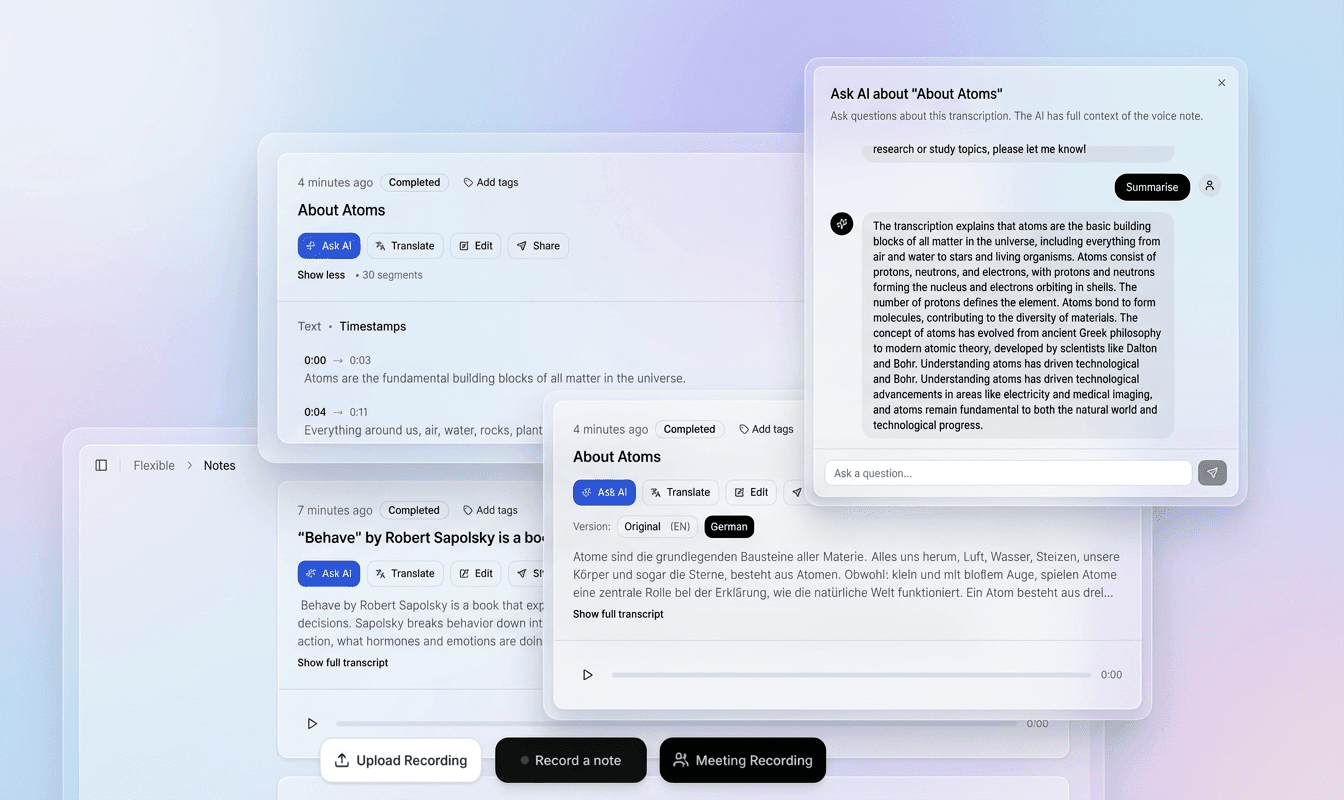
Use the recording and timestamped text together to check names, unfamiliar words and speaker changes in context.
Correct the transcript in the editor, refine segments and prepare a version that fits your document or video.
Export plain text, structured data or subtitle files. Use the transcript for notes, research, captions and follow-up work.
Choose a file above to continue to signup. Your recording stays on your device at this step.
In the app, choose your file again, select its spoken language and model, then start transcription.
Check the draft against your recording, correct the text and timing, then export the format you need.
Regional speech and spelling conventions matter. Identify the variety in your recording and check an excerpt before committing a larger project.
Review Bashkir recordings with attention to Bashkir Cyrillic letters, recurring names and changes into Russian.
Results depend on the recording, selected model and language variety. Review names, specialist terms and unclear passages before sharing or publishing.
Check Bashkir-specific letters in context rather than accepting similar-looking Russian spellings.
Review Russian passages and borrowed names with the recording available.
Review language-specific Cyrillic letters and names. Check for Latin characters accidentally mixed into Cyrillic words when editing or copying text.
What to listen for when reviewing the first draft.
Bashkir has a complex system of vowel harmony and reduction in unstressed syllables, which can confuse ASR models. Listen to a representative section before processing a long Bashkir recording. Background voices, music and distortion can obscure words; keep uncertain passages marked for review and compare them with the original audio.
Bashkir consonants exhibit allophonic variations influenced by adjacent vowels (e.g., velarization). Check Bashkir spelling against the recording and the writing convention used by your project. Review names, diacritics and unfamiliar word forms before exporting; a page’s script label does not replace checking the actual written output.
Significant differences between Eastern, Western, and Southern dialects in pronunciation and vocabulary. Regional Bashkir pronunciation and vocabulary need review in their own context. When working with Eastern Bashkir, Western Bashkir, Southern Bashkir, keep the speaker’s wording and check unfamiliar forms with a fluent reviewer.
Practical ways to turn a recording into material you can search, edit and reuse.
Generate subtitles for Bashkir-language TV shows, films, and YouTube channels, making content accessible to a wider audience.
Transcribe interviews and discussions in Bashkir for show notes, searchability, and archival purposes.
Convert oral recordings of Bashkir folklore, interviews, and linguistic fieldwork into text for analysis and preservation.
Create transcripts of Bashkir lessons and dialogues to help learners improve listening and reading skills.
Work from a saved Bashkir audio or video recording in the online app. Review the resulting transcript and export SRT or VTT captions for your video; this describes a recorded-file workflow.
Digitize and transcribe historical audio recordings of Bashkir epic poems, songs, and oral traditions.
After transcription and review in the app, choose the output that fits your next step.
Bashkir (Башҡорт теле) is a Turkic language spoken, primarily in the Republic of Bashkortostan, a federal subject of Russia. It is also spoken in neighboring regions like Tatarstan, Chelyabinsk Oblast, and Orenburg Oblast. The language uses the Cyrillic script with additional letters unique to its phonology, such as Ҙ (voiced th), Ҫ (voiceless th), Ҡ (deep k), Ғ (voiced uvular fricative), and Ө (front rounded vowel). Bashkir has a rich literary tradition and is used in Bashkortostan alongside Russian.
As a minority language in a predominantly Russian-speaking country, Bashkir faces challenges in digital preservation and accessibility. Accurate speech-to-text technology can help:
Without reliable speech-to-text, many of these applications remain out of reach for Bashkir speakers.
Bashkir exhibits vowel harmony, where suffixes must match the vowel of the root in terms of frontness and rounding. ASR systems must capture long-distance dependencies. Additionally, unstressed vowels often reduce, making them harder to distinguish. Regional Bashkir pronunciation and vocabulary need review in their own context. When working with Eastern Bashkir, Western Bashkir, Southern Bashkir, keep the speaker’s wording and check unfamiliar forms with a fluent reviewer.
Certain consonants change their pronunciation depending on surrounding vowels. For example, the phoneme /l/ is velarized before back vowels and palatalized before front vowels. Similarly, /k/ can be aspirated or not. These subtle variations can trip up generic models. Listen to a representative section before processing a long Bashkir recording. Background voices, music and distortion can obscure words; keep uncertain passages marked for review and compare them with the original audio.
Eastern, Western, and Southern dialects differ in pronunciation, vocabulary, and even some grammatical endings.
Check Bashkir-specific letters in context rather than accepting similar-looking Russian spellings. Review Russian passages and borrowed names with the recording available.
Try it today and see the difference specialized AI can make for your language.
Speechyou supports Bashkir (Cyrillic) speech-to-text, transcription, and subtitle generation in SRT and VTT formats. Get started with a free account.
Practical details before you start.
Regional Bashkir pronunciation and vocabulary need review in their own context. When working with Eastern Bashkir, Western Bashkir, Southern Bashkir, keep the speaker’s wording and check unfamiliar forms with a fluent reviewer. Start with a short representative sample before processing an archive, and do not assume identical recognition quality across varieties.
Listen to a representative section before processing a long Bashkir recording. Background voices, music and distortion can obscure words; keep uncertain passages marked for review and compare them with the original audio. Check Bashkir-specific letters in context rather than accepting similar-looking Russian spellings.
Check Bashkir spelling against the recording and the writing convention used by your project. Review names, diacritics and unfamiliar word forms before exporting; a page’s script label does not replace checking the actual written output. Check Bashkir-specific letters in context rather than accepting similar-looking Russian spellings.
After uploading and reviewing your Bashkir recording in the app, export SRT or VTT subtitles. Preview the file with your video and check names, line breaks and timing before publishing. TXT and JSON are also available for transcript workflows.
Check Bashkir-specific letters in context rather than accepting similar-looking Russian spellings. Review Russian passages and borrowed names with the recording available. Check Bashkir-specific letters in context rather than accepting similar-looking Russian spellings.
Yes, Speechyou supports exporting transcripts as plain text, SRT, VTT, and other common formats. You can also edit the transcription directly in the web interface before exporting.
Keep the spoken words in the transcript. Translate only as a separate, explicit editing task.
Review the cyrillic script text and check that it matches your project’s writing convention. Any transliteration or translation should be an explicit editing task; the page name alone is not a guarantee of automatic conversion.
No. Choosing or dropping a file takes you to signup. The landing page does not upload, store or transcribe it. After creating your account, select the file again in the app and choose the spoken language and model.
The app accepts MP3, WAV, AAC, OGG, FLAC and M4A audio, plus MP4, WEBM, MOV, M4V and MPEG/MPG video. The free trial and Solo support files up to 10 GB each. You can extract or trim a short section first to evaluate the result.
In the app, review and edit the transcript before exporting. Use TXT for plain text, SRT for video editors and YouTube, VTT for web captions, or JSON for structured data. Check subtitle timing and line breaks against the original video before publishing.
Create an account to transcribe in the app. Solo includes uploads up to 10 GB per file and $15/month or $67/year billing.
Full access with monthly billing.
Choose the language and writing system that match your recording.
Create your account, upload your file in the app and turn your audio into a transcript you can review.