
Mari Language Media Production
Generate accurate subtitles for Mari-language TV shows, films, and YouTube videos, preserving the language for a wider audience.
Prepare a transcript draft from Eastern Mari (Meadow Mari, Cyrillic script) audio or video, then review the text alongside your recording.
An account is required. Choose your file in the app after signing up or signing in.
Continue to Speechyou to upload your Mari audio or video.
or drop a file here
MP3, WAV, M4A, MP4 and more
Continue to signup. Your file stays on your device; choose it again in the app after creating your account.
No file is uploaded on this page.
Work with your recording after transcription: review the text, find the passage you need and prepare it for the next step.
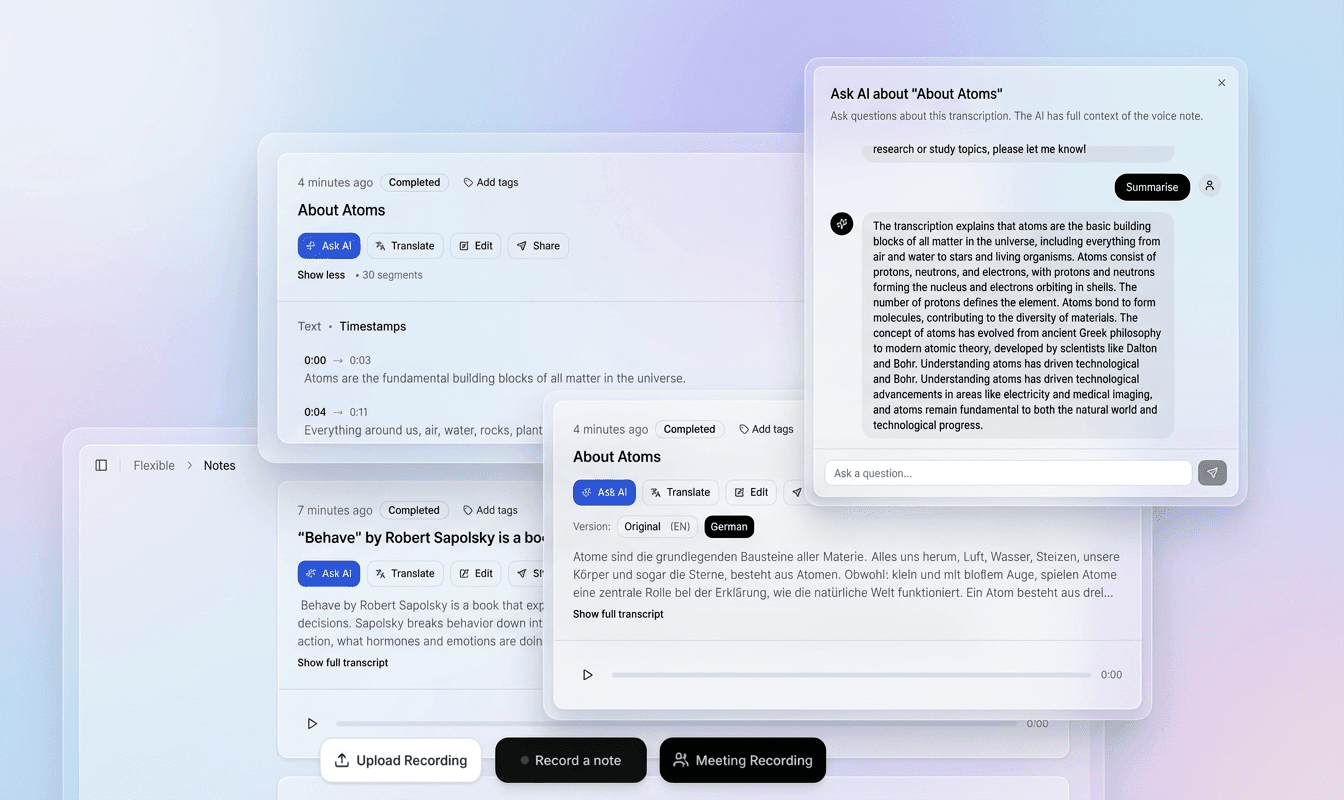
Use the recording and timestamped text together to check names, unfamiliar words and speaker changes in context.
Correct the transcript in the editor, refine segments and prepare a version that fits your document or video.
Export plain text, structured data or subtitle files. Use the transcript for notes, research, captions and follow-up work.
Choose a file above to continue to signup. Your recording stays on your device at this step.
In the app, choose your file again, select its spoken language and model, then start transcription.
Check the draft against your recording, correct the text and timing, then export the format you need.
Regional speech and spelling conventions matter. Identify the variety in your recording and check an excerpt before committing a larger project.
Choose the Mari variety appropriate to the recording and keep that choice clear through transcript review. For Eastern Mari (Meadow Mari, Cyrillic script) recordings, keep the variety and writing convention in your project notes.
Results depend on the recording, selected model and language variety. Review names, specialist terms and unclear passages before sharing or publishing.
Use the Eastern Mari or Western Mari page as appropriate and document the speaker’s variety.
Check names and language changes against the audio, keeping the intended script consistent.
Review language-specific Cyrillic letters and names. Check for Latin characters accidentally mixed into Cyrillic words when editing or copying text.
What to listen for when reviewing the first draft.
Eastern Mari features complex vowel harmony and agglutinative word formation, often creating very long words. Regional Eastern Mari pronunciation and vocabulary need review in their own context. When working with Meadow Mari (олык марий), Ural Mari (урал марий), Eastern Mari of Kirov Oblast (Киров вел марий), keep the speaker’s wording and check unfamiliar forms with a fluent reviewer.
Regional Eastern Mari pronunciation and vocabulary need review in their own context. When working with Meadow Mari (олык марий), Ural Mari (урал марий), Eastern Mari of Kirov Oblast (Киров вел марий), keep the speaker’s wording and check unfamiliar forms with a fluent reviewer. Use the Eastern Mari or Western Mari page as appropriate and document the speaker’s variety. Check names and language changes against the audio, keeping the intended script consistent.
Meadow, Ural, and other subdialects differ in pronunciation and vocabulary. Regional Eastern Mari pronunciation and vocabulary need review in their own context. When working with Meadow Mari (олык марий), Ural Mari (урал марий), Eastern Mari of Kirov Oblast (Киров вел марий), keep the speaker’s wording and check unfamiliar forms with a fluent reviewer.
Mari uses unique letters like ӱ, ӧ, ҥ, and ӹ, which are often misrecognized by generic systems. Check Eastern Mari spelling against the recording and the writing convention used by your project. Review names, diacritics and unfamiliar word forms before exporting; a page’s script label does not replace checking the actual written output.
Practical ways to turn a recording into material you can search, edit and reuse.
Generate accurate subtitles for Mari-language TV shows, films, and YouTube videos, preserving the language for a wider audience.
Transcribe Mari language lessons, lectures, and educational materials to support learners and teachers in the Mari El Republic.
Record and transcribe interviews with Mari elders, safeguarding traditional knowledge and folklore for future generations.
Convert spoken Mari into text for phonetic analysis, documentation of dialectal variation, and corpus building.
Work from a saved Eastern Mari audio or video recording in the online app. Review the resulting transcript and export SRT or VTT captions for your video; this describes a recorded-file workflow.
Transcribe Mari podcasts, interviews, and vlogs quickly to create blog posts, show notes, and social media snippets.
After transcription and review in the app, choose the output that fits your next step.
Eastern Mari (Meadow Mari) is a Finno-Ugric language spoken in the Mari El Republic of Russia and neighboring regions. Despite its rich cultural heritage, the language faces challenges from the dominance of Russian and limited digital resources. Accurate speech-to-text technology offers a way to bridge the digital divide, allowing Mari speakers to create content, archive their oral traditions, and access modern tools in their native tongue.
For a minority language like Mari, every transcribed word is a step toward preservation. Transcriptions make audio content searchable, translatable, and reusable. They enable:
Without accurate ASR, these tasks require manual effort or expensive human transcription services, which are often unavailable for Mari.
Transcribing Eastern Mari is not straightforward. The language has:
Regional Eastern Mari pronunciation and vocabulary need review in their own context. When working with Meadow Mari (олык марий), Ural Mari (урал марий), Eastern Mari of Kirov Oblast (Киров вел марий), keep the speaker’s wording and check unfamiliar forms with a fluent reviewer.
Mari-language content creators can now generate accurate subtitles automatically, expanding their reach to viewers who prefer reading along or who speak other Uralic languages.
Schools in Mari El can transcribe lessons and create bilingual materials. Language learners can upload audio from native speakers and get text to study.
Elders’ stories, folklore, and songs can be recorded and transcribed, creating a permanent digital archive that is searchable and shareable.
Work from a saved Eastern Mari audio or video recording in the online app. Review the resulting transcript and export SRT or VTT captions for your video; this describes a recorded-file workflow.
Compare transcription tools using a short recording from your own project. Check the language and script choices, the amount of manual correction, the export formats you need and the published terms. A review by a fluent speaker is more useful than an unmeasured accuracy claim.
Eastern Mari is a precious linguistic heritage that deserves to thrive in the digital age. Use the Eastern Mari or Western Mari page as appropriate and document the speaker’s variety. Check names and language changes against the audio, keeping the intended script consistent. Try it today and see how easy it is to transcribe Mari audio.
Practical details before you start.
Check Eastern Mari spelling against the recording and the writing convention used by your project. Review names, diacritics and unfamiliar word forms before exporting; a page’s script label does not replace checking the actual written output. Use the Eastern Mari or Western Mari page as appropriate and document the speaker’s variety.
The app has an optional speaker-identification control. Review speaker turns against the audio, especially when voices overlap, and correct names and attribution before quoting or publishing the transcript.
Regional Eastern Mari pronunciation and vocabulary need review in their own context. When working with Meadow Mari (олык марий), Ural Mari (урал марий), Eastern Mari of Kirov Oblast (Киров вел марий), keep the speaker’s wording and check unfamiliar forms with a fluent reviewer. Start with a short representative sample before processing an archive, and do not assume identical recognition quality across varieties.
Upload common supported audio formats such as MP3, WAV, M4A, AAC, OGG or FLAC, or video formats such as MP4, MOV or WEBM. Video transcription uses the audio track. Open your account first, select the recording language in the app, and review the result before export.
Speechyou offers a three-day Solo trial. The published Solo price is $15 per month or $67 per year, with uploads up to 10 GB. Check the pricing shown at signup before starting your trial.
Use the Eastern Mari or Western Mari page as appropriate and document the speaker’s variety. Check names and language changes against the audio, keeping the intended script consistent. Use the Eastern Mari or Western Mari page as appropriate and document the speaker’s variety.
Keep the recording’s variety and consult an appropriate reviewer. Do not assume one variety’s forms should replace those of the other.
Review the cyrillic script text and check that it matches your project’s writing convention. Any transliteration or translation should be an explicit editing task; the page name alone is not a guarantee of automatic conversion.
No. Choosing or dropping a file takes you to signup. The landing page does not upload, store or transcribe it. After creating your account, select the file again in the app and choose the spoken language and model.
The app accepts MP3, WAV, AAC, OGG, FLAC and M4A audio, plus MP4, WEBM, MOV, M4V and MPEG/MPG video. The free trial and Solo support files up to 10 GB each. You can extract or trim a short section first to evaluate the result.
In the app, review and edit the transcript before exporting. Use TXT for plain text, SRT for video editors and YouTube, VTT for web captions, or JSON for structured data. Check subtitle timing and line breaks against the original video before publishing.
Create an account to transcribe in the app. Solo includes uploads up to 10 GB per file and $15/month or $67/year billing.
Full access with monthly billing.
Choose the language and writing system that match your recording.
Create your account, upload your file in the app and turn your audio into a transcript you can review.