
Oral History Preservation
Transcribe centuries-old Erzya folk tales, songs, and oral traditions recorded in interviews or field recordings for archiving and research.
Prepare a transcript draft from Erzya (Cyrillic script) audio or video, then review the text alongside your recording.
An account is required. Choose your file in the app after signing up or signing in.
Continue to Speechyou to upload your Erzya audio or video.
or drop a file here
MP3, WAV, M4A, MP4 and more
Continue to signup. Your file stays on your device; choose it again in the app after creating your account.
No file is uploaded on this page.
Work with your recording after transcription: review the text, find the passage you need and prepare it for the next step.
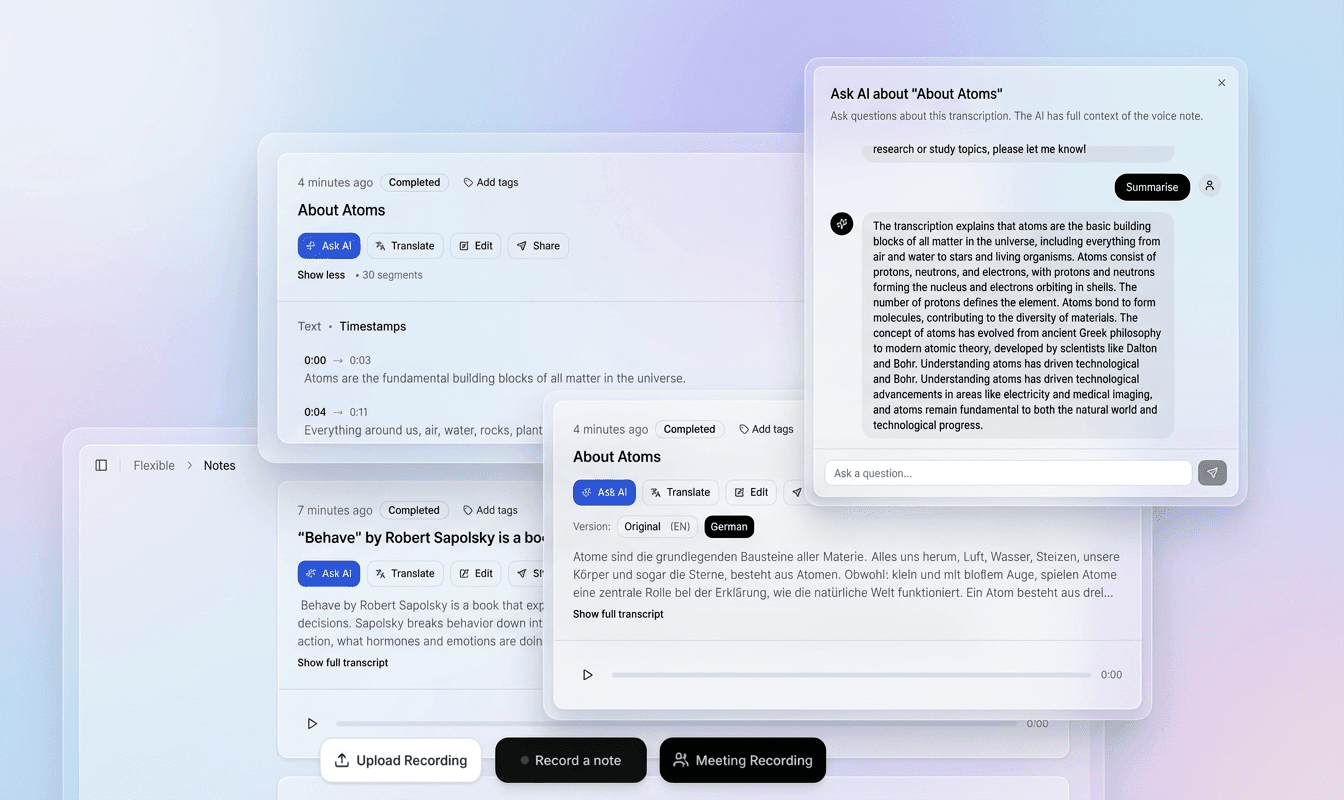
Use the recording and timestamped text together to check names, unfamiliar words and speaker changes in context.
Correct the transcript in the editor, refine segments and prepare a version that fits your document or video.
Export plain text, structured data or subtitle files. Use the transcript for notes, research, captions and follow-up work.
Choose a file above to continue to signup. Your recording stays on your device at this step.
In the app, choose your file again, select its spoken language and model, then start transcription.
Check the draft against your recording, correct the text and timing, then export the format you need.
Regional speech and spelling conventions matter. Identify the variety in your recording and check an excerpt before committing a larger project.
Prepare Erzya audio for review while keeping its vocabulary and Cyrillic text distinct from Russian and Moksha.
Results depend on the recording, selected model and language variety. Review names, specialist terms and unclear passages before sharing or publishing.
Check that the recording is Erzya and avoid substituting related or neighbouring language forms.
Review names, language-specific spellings and any Russian passages with the original recording.
Review language-specific Cyrillic letters and names. Check for Latin characters accidentally mixed into Cyrillic words when editing or copying text.
What to listen for when reviewing the first draft.
Regional Erzya pronunciation and vocabulary need review in their own context. When working with Central Erzya, Eastern Erzya, Western Erzya, keep the speaker’s wording and check unfamiliar forms with a fluent reviewer. Check that the recording is Erzya and avoid substituting related or neighbouring language forms. Review names, language-specific spellings and any Russian passages with the original recording.
Erzya has a complex vowel harmony system and palatalized consonants that can be difficult for generic ASR models. Regional Erzya pronunciation and vocabulary need review in their own context. When working with Central Erzya, Eastern Erzya, Western Erzya, keep the speaker’s wording and check unfamiliar forms with a fluent reviewer.
Differences between Central, Eastern, Western, and Southern dialects can affect transcription accuracy. Regional Erzya pronunciation and vocabulary need review in their own context. When working with Central Erzya, Eastern Erzya, Western Erzya, keep the speaker’s wording and check unfamiliar forms with a fluent reviewer.
Erzya uses an extended Cyrillic alphabet with additional letters (ӓ, ӧ, ӱ, etc.). Check Erzya spelling against the recording and the writing convention used by your project. Review names, diacritics and unfamiliar word forms before exporting; a page’s script label does not replace checking the actual written output.
Practical ways to turn a recording into material you can search, edit and reuse.
Transcribe centuries-old Erzya folk tales, songs, and oral traditions recorded in interviews or field recordings for archiving and research.
Generate Erzya subtitles for regional TV news, community videos, or YouTube content to reach a wider audience including younger Erzya speakers.
Convert Erzya language lessons, podcasts, and lectures into text and subtitles for students and learners of Erzya.
Transcribe linguistic interviews, sociolinguistic surveys, and field notes in Erzya for analysis in Uralic studies.
Create Erzya-language captions for community events, religious services, or public announcements to make them accessible.
Turn Erzya-language podcasts, audiobooks, or radio shows into searchable text and subtitle files for indexing and distribution.
After transcription and review in the app, choose the output that fits your next step.
Erzya (Эрзянь кель) is a Uralic language spoken primarily in the Republic of Mordovia, Russia, and by diaspora communities in other parts of Russia and abroad. Despite its rich oral tradition, Erzya has limited digital presence, making automatic speech recognition (ASR) a valuable tool for preservation and accessibility.
Preserving a language goes beyond dictionaries and grammar books. Audio recordings of stories, interviews, songs, and everyday conversations hold the true living texture of Erzya. Converting these recordings into written text opens up possibilities for:
Without accurate speech-to-text, these valuable recordings remain hidden in audio files, difficult to search or share.
Erzya presents several challenges for ASR systems:
Check that the recording is Erzya and avoid substituting related or neighbouring language forms. Review names, language-specific spellings and any Russian passages with the original recording. Users can also request SRT or VTT subtitles for video files.
Elders in Mordovian villages have recorded thousands of hours of folk tales, epic songs, and personal narratives. Transcribing these with Speechyou allows researchers to create searchable archives and younger Erzya speakers to read along with the audio.
Local TV stations and YouTubers who produce content in Erzya can add subtitles to reach a broader audience, including those who may not be fluent speakers but are learning the language.
Schools and language courses can use transcriptions of authentic Erzya conversations to teach reading and listening comprehension. Text from audio can be turned into exercises or study materials.
Linguists studying Uralic languages can quickly transcribe field recordings, saving hours of manual work. The transcribed text can be tagged and analyzed for grammatical patterns.
Deaf and hard-of-hearing members of the Erzya community gain access to audio content through captions created by Speechyou.
To transcribe an Erzya audio file, simply upload it to Speechyou and select "Erzya (Cyrillic script)" as the target language. The system will process the audio and produce a text transcript, which you can then download as plain text, SRT, or VTT.
Erzya is a language with a rich cultural heritage, but it faces the digital divide common to many minority languages. Whether you are a linguist, a content creator, or a community activist, you can now transcribe Erzya audio with ease, ensuring that the language remains vibrant and accessible in the digital age.
Practical details before you start.
The app has an optional speaker-identification control. Review speaker turns against the audio, especially when voices overlap, and correct names and attribution before quoting or publishing the transcript.
Check Erzya spelling against the recording and the writing convention used by your project. Review names, diacritics and unfamiliar word forms before exporting; a page’s script label does not replace checking the actual written output. Check that the recording is Erzya and avoid substituting related or neighbouring language forms.
Regional Erzya pronunciation and vocabulary need review in their own context. When working with Central Erzya, Eastern Erzya, Western Erzya, keep the speaker’s wording and check unfamiliar forms with a fluent reviewer. Start with a short representative sample before processing an archive, and do not assume identical recognition quality across varieties.
After uploading and reviewing your Erzya recording in the app, export SRT or VTT subtitles. Preview the file with your video and check names, line breaks and timing before publishing. TXT and JSON are also available for transcript workflows.
For mixed-language Erzya recordings, mark each language change during review and check borrowed words and names against the audio. Correct any passage that has been normalized into the wrong language. Select the main recording language in the app and check the other-language passages separately.
Listen to a representative section before processing a long Erzya recording. Background voices, music and distortion can obscure words; keep uncertain passages marked for review and compare them with the original audio. Check that the recording is Erzya and avoid substituting related or neighbouring language forms.
No. Choose the language in the recording and review the wording accordingly rather than treating related languages as interchangeable.
Review the cyrillic script text and check that it matches your project’s writing convention. Any transliteration or translation should be an explicit editing task; the page name alone is not a guarantee of automatic conversion.
No. Choosing or dropping a file takes you to signup. The landing page does not upload, store or transcribe it. After creating your account, select the file again in the app and choose the spoken language and model.
The app accepts MP3, WAV, AAC, OGG, FLAC and M4A audio, plus MP4, WEBM, MOV, M4V and MPEG/MPG video. The free trial and Solo support files up to 10 GB each. You can extract or trim a short section first to evaluate the result.
In the app, review and edit the transcript before exporting. Use TXT for plain text, SRT for video editors and YouTube, VTT for web captions, or JSON for structured data. Check subtitle timing and line breaks against the original video before publishing.
Create an account to transcribe in the app. Solo includes uploads up to 10 GB per file and $15/month or $67/year billing.
Full access with monthly billing.
Choose the language and writing system that match your recording.
Create your account, upload your file in the app and turn your audio into a transcript you can review.