
Podcast Transcription
Gagauz-language podcasts on culture, history, and current events can be transcribed automatically for show notes and accessibility.
Prepare a transcript draft from Gagauz (Cyrillic script) audio or video, then review the text alongside your recording.
An account is required. Choose your file in the app after signing up or signing in.
Continue to Speechyou to upload your Gagauz audio or video.
or drop a file here
MP3, WAV, M4A, MP4 and more
Continue to signup. Your file stays on your device; choose it again in the app after creating your account.
No file is uploaded on this page.
Work with your recording after transcription: review the text, find the passage you need and prepare it for the next step.
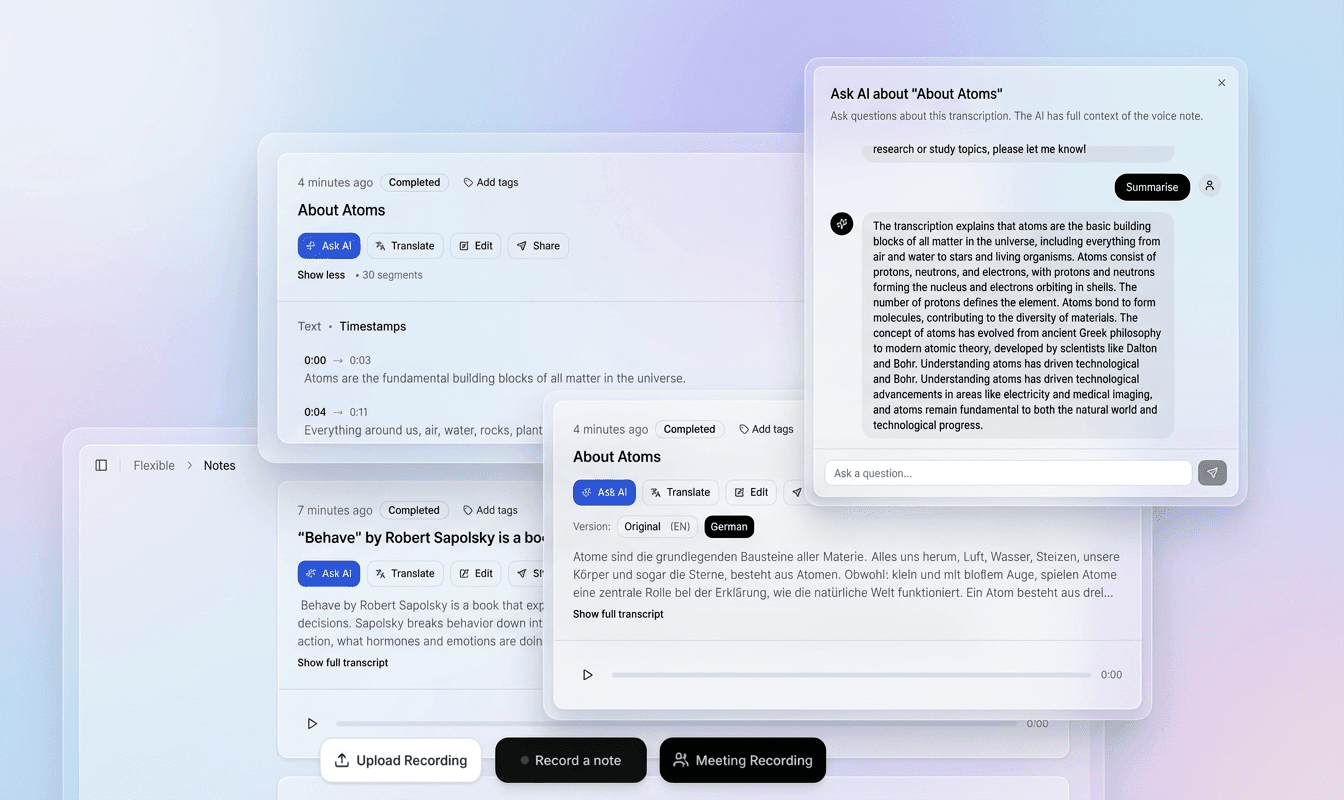
Use the recording and timestamped text together to check names, unfamiliar words and speaker changes in context.
Correct the transcript in the editor, refine segments and prepare a version that fits your document or video.
Export plain text, structured data or subtitle files. Use the transcript for notes, research, captions and follow-up work.
Choose a file above to continue to signup. Your recording stays on your device at this step.
In the app, choose your file again, select its spoken language and model, then start transcription.
Check the draft against your recording, correct the text and timing, then export the format you need.
Regional speech and spelling conventions matter. Identify the variety in your recording and check an excerpt before committing a larger project.
Choose the Gagauz page with the script your project needs, then review names and the spoken wording alongside the audio. For Gagauz (Cyrillic script) recordings, keep the variety and writing convention in your project notes.
Results depend on the recording, selected model and language variety. Review names, specialist terms and unclear passages before sharing or publishing.
Check Latin or Cyrillic requirements before editing so the final text has a consistent writing system.
Review passages in Russian or another language without silently changing the speaker’s wording.
Review language-specific Cyrillic letters and names. Check for Latin characters accidentally mixed into Cyrillic words when editing or copying text.
What to listen for when reviewing the first draft.
Gagauz is a low-resource language with few publicly available speech corpora. Regional Gagauz pronunciation and vocabulary need review in their own context. When working with Bulgar Gagauz, Maritime Gagauz, Central Gagauz, keep the speaker’s wording and check unfamiliar forms with a fluent reviewer.
Turkic vowel harmony and palatalized consonants are challenging for ASR. Listen to a representative section before processing a long Gagauz recording. Background voices, music and distortion can obscure words; keep uncertain passages marked for review and compare them with the original audio.
Gagauz historically used Cyrillic with specific diacritics; some speakers mix Latin and Cyrillic. Speechyou supports standard Cyrillic input and output.
Practical ways to turn a recording into material you can search, edit and reuse.
Gagauz-language podcasts on culture, history, and current events can be transcribed automatically for show notes and accessibility.
Add accurate Cyrillic subtitles to Gagauz YouTube videos, documentaries, and films, expanding reach to the diaspora.
Check Latin or Cyrillic requirements before editing so the final text has a consistent writing system. Review passages in Russian or another language without silently changing the speaker’s wording.
Many Gagauz Orthodox services are in Gagauz; transcribe sermons for study and distribution.
Convert Gagauz audio lessons into text for learners and teachers, supporting language revitalization.
Work from a saved Gagauz audio or video recording in the online app. Review the resulting transcript and export SRT or VTT captions for your video; this describes a recorded-file workflow.
After transcription and review in the app, choose the output that fits your next step.
Gagauz (Gagauz dili) is a Turkic language spoken primarily in the autonomous region of Gagauzia in Moldova, with smaller communities in Ukraine, Bulgaria, and diaspora groups worldwide. However, like many minority languages, Gagauz faces challenges in the digital age, particularly in accessing modern tools like automatic speech recognition (ASR) and subtitle generation. Check Gagauz spelling against the recording and the writing convention used by your project. Review names, diacritics and unfamiliar word forms before exporting; a page’s script label does not replace checking the actual written output.
For Gagauz speakers, the ability to transcribe audio and video content automatically opens doors to preservation, education, and media accessibility. Without a reliable speech to text tool, these tasks require manual effort or expensive professional services. Regional Gagauz pronunciation and vocabulary need review in their own context. When working with Bulgar Gagauz, Maritime Gagauz, Central Gagauz, keep the speaker’s wording and check unfamiliar forms with a fluent reviewer.
Gagauz presents several hurdles for ASR systems:
The platform supports uploading audio and video files in common formats, and outputs plain text, SRT, or VTT subtitles. With unlimited transcription included in the Solo plan, users can process large volumes without worrying about per-minute costs. For mixed-language Gagauz recordings, mark each language change during review and check borrowed words and names against the audio. Correct any passage that has been normalized into the wrong language.
For Gagauz communities, this tool is not just a convenience—it's a means of language revitalization. By making transcription easy and affordable, Speechyou helps ensure that Gagauz voices are heard, documented, and shared across generations. Whether you are a researcher, content creator, or community member, our Gagauz transcription service empowers you to turn spoken words into lasting text.
Practical details before you start.
Check Gagauz spelling against the recording and the writing convention used by your project. Review names, diacritics and unfamiliar word forms before exporting; a page’s script label does not replace checking the actual written output. Check Latin or Cyrillic requirements before editing so the final text has a consistent writing system.
For mixed-language Gagauz recordings, mark each language change during review and check borrowed words and names against the audio. Correct any passage that has been normalized into the wrong language. Select the main recording language in the app and check the other-language passages separately.
Check Latin or Cyrillic requirements before editing so the final text has a consistent writing system. Review passages in Russian or another language without silently changing the speaker’s wording. Check Latin or Cyrillic requirements before editing so the final text has a consistent writing system.
Speechyou uses a combination of licensed Gagauz audio from media, community contributions, and synthetic data. Check Latin or Cyrillic requirements before editing so the final text has a consistent writing system. Review passages in Russian or another language without silently changing the speaker’s wording.
Yes, provided the audio quality is reasonable. Older recordings with background noise may have lower accuracy; we recommend pre-processing audio to reduce noise.
Check Gagauz spelling against the recording and the writing convention used by your project. Review names, diacritics and unfamiliar word forms before exporting; a page’s script label does not replace checking the actual written output. Check Latin or Cyrillic requirements before editing so the final text has a consistent writing system.
They are script-labelled routes within this Gagauz group. Choose according to the intended text and review the output; a script label is not a translation setting.
Review the cyrillic script text and check that it matches your project’s writing convention. Any transliteration or translation should be an explicit editing task; the page name alone is not a guarantee of automatic conversion.
No. Choosing or dropping a file takes you to signup. The landing page does not upload, store or transcribe it. After creating your account, select the file again in the app and choose the spoken language and model.
The app accepts MP3, WAV, AAC, OGG, FLAC and M4A audio, plus MP4, WEBM, MOV, M4V and MPEG/MPG video. The free trial and Solo support files up to 10 GB each. You can extract or trim a short section first to evaluate the result.
In the app, review and edit the transcript before exporting. Use TXT for plain text, SRT for video editors and YouTube, VTT for web captions, or JSON for structured data. Check subtitle timing and line breaks against the original video before publishing.
Create an account to transcribe in the app. Solo includes uploads up to 10 GB per file and $15/month or $67/year billing.
Full access with monthly billing.
Choose the language and writing system that match your recording.
Create your account, upload your file in the app and turn your audio into a transcript you can review.