
Basque Media Transcription
Transcribe Basque radio programs, TV shows, and podcasts for accessibility and content repurposing.
Prepare a transcript draft from Basque audio or video, then review the text alongside your recording.
An account is required. Choose your file in the app after signing up or signing in.
Continue to Speechyou to upload your Basque audio or video.
or drop a file here
MP3, WAV, M4A, MP4 and more
Continue to signup. Your file stays on your device; choose it again in the app after creating your account.
No file is uploaded on this page.
Work with your recording after transcription: review the text, find the passage you need and prepare it for the next step.
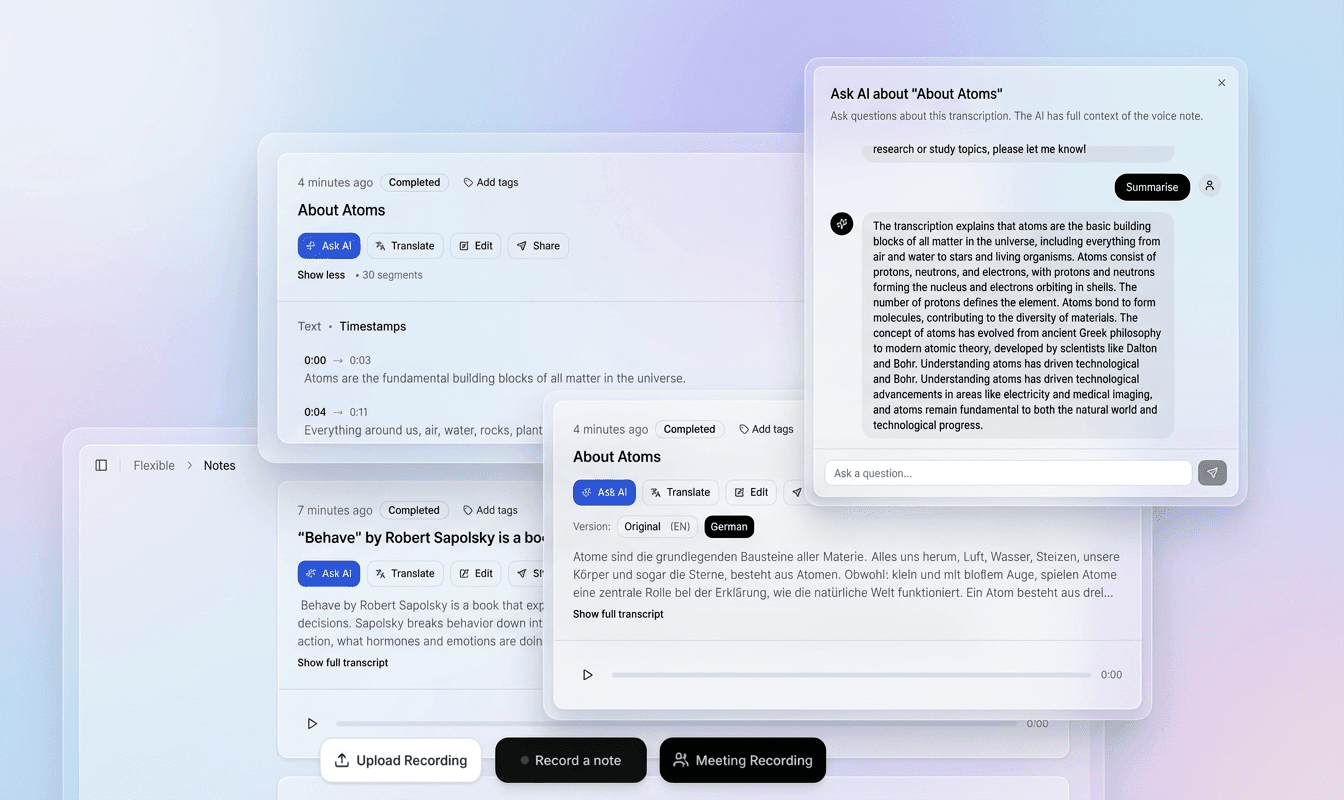
Use the recording and timestamped text together to check names, unfamiliar words and speaker changes in context.
Correct the transcript in the editor, refine segments and prepare a version that fits your document or video.
Export plain text, structured data or subtitle files. Use the transcript for notes, research, captions and follow-up work.
Choose a file above to continue to signup. Your recording stays on your device at this step.
In the app, choose your file again, select its spoken language and model, then start transcription.
Check the draft against your recording, correct the text and timing, then export the format you need.
Regional speech and spelling conventions matter. Identify the variety in your recording and check an excerpt before committing a larger project.
Review Basque speech with attention to the speaker’s variety, compound words and any Spanish or French passages.
Results depend on the recording, selected model and language variety. Review names, specialist terms and unclear passages before sharing or publishing.
Check regional forms in context. Do not replace them with Batua forms unless that is an explicit editorial choice.
Review names and changes into Spanish or French against the original audio.
Review accents and language-specific letters. Check that similar-looking Cyrillic characters have not entered Latin words when editing or copying text.
What to listen for when reviewing the first draft.
Basque is agglutinative with many suffixes that change meaning. Regional Basque pronunciation and vocabulary need review in their own context. When working with Biscayan (Bizkaiera), Gipuzkoan (Gipuzkera), Upper Navarrese (Nafarrera), keep the speaker’s wording and check unfamiliar forms with a fluent reviewer.
Significant phonological and lexical differences between dialects. Regional Basque pronunciation and vocabulary need review in their own context. When working with Biscayan (Bizkaiera), Gipuzkoan (Gipuzkera), Upper Navarrese (Nafarrera), keep the speaker’s wording and check unfamiliar forms with a fluent reviewer.
As a minority language, Basque has less available speech data than major languages. Check regional forms in context. Do not replace them with Batua forms unless that is an explicit editorial choice. Review names and changes into Spanish or French against the original audio.
Basque distinguishes between laminal and apical sibilants (e.g., /s̻/ vs /s̺/). Listen to a representative section before processing a long Basque recording. Background voices, music and distortion can obscure words; keep uncertain passages marked for review and compare them with the original audio.
Practical ways to turn a recording into material you can search, edit and reuse.
Transcribe Basque radio programs, TV shows, and podcasts for accessibility and content repurposing.
Create subtitles for Basque-language online courses and university lectures to improve learning outcomes.
Transcribe Basque parliamentary sessions, public meetings, and official documents for transparency and record-keeping.
Convert oral histories and traditional Basque stories into text to preserve linguistic heritage.
Generate subtitles for Basque videos to make content accessible to deaf and hard-of-hearing audiences.
Transcribe Basque language interviews and field recordings for linguistic analysis and corpus building.
Transcribe Basque business meetings and conferences for accurate minutes and multilingual distribution.
After transcription and review in the app, choose the output that fits your next step.
Basque (Euskara) is a linguistic gem: a language isolate with no known relatives, spoken for thousands of years in the western Pyrenees. Today, is used in the Basque Autonomous Community and parts of Navarre in Spain, and it has minority status in the French Basque Country. Accurate speech-to-text technology is vital for its digital survival.
Transcribing Basque audio is not just about convenience; it is about accessibility and preservation. Basque-language media, from radio stations like Euskadi Irratia to online video creators, need subtitles to reach wider audiences. Researchers studying Basque oral literature and history rely on transcripts for analysis. For deaf and hard-of-hearing Basque speakers, captions are essential for inclusion. Speechyou's Basque speech-to-text fills a gap that many global transcription tools ignore.
Compare transcription tools using a short recording from your own project. Check the language and script choices, the amount of manual correction, the export formats you need and the published terms. A review by a fluent speaker is more useful than an unmeasured accuracy claim.
The AI processes the audio and returns a transcript ready for editing. You can then export subtitles for your videos or download the text. Whether you are a linguist, a content creator, or a cultural activist, Speechyou empowers you to work with Basque speech effortlessly.
Basque is a language of resilience. With Speechyou, you can ensure it continues to thrive in the digital world.
Practical details before you start.
Regional Basque pronunciation and vocabulary need review in their own context. When working with Biscayan (Bizkaiera), Gipuzkoan (Gipuzkera), Upper Navarrese (Nafarrera), keep the speaker’s wording and check unfamiliar forms with a fluent reviewer. Start with a short representative sample before processing an archive, and do not assume identical recognition quality across varieties.
After uploading and reviewing your Basque recording in the app, export SRT or VTT subtitles. Preview the file with your video and check names, line breaks and timing before publishing. TXT and JSON are also available for transcript workflows.
Check regional forms in context. Do not replace them with Batua forms unless that is an explicit editorial choice. Review names and changes into Spanish or French against the original audio. Regional Basque pronunciation and vocabulary need review in their own context. When working with Biscayan (Bizkaiera), Gipuzkoan (Gipuzkera), Upper Navarrese (Nafarrera), keep the speaker’s wording and check unfamiliar forms with a fluent reviewer.
Absolutely. Check regional forms in context. Do not replace them with Batua forms unless that is an explicit editorial choice. Review names and changes into Spanish or French against the original audio. It is ideal for preserving Basque oral traditions and interviews.
Check Basque spelling against the recording and the writing convention used by your project. Review names, diacritics and unfamiliar word forms before exporting; a page’s script label does not replace checking the actual written output. Check regional forms in context. Do not replace them with Batua forms unless that is an explicit editorial choice.
Yes. Many podcasters use Speechyou to generate show notes and subtitles. Check regional forms in context. Do not replace them with Batua forms unless that is an explicit editorial choice. Review names and changes into Spanish or French against the original audio.
Only if that is your editorial goal. A transcript should first preserve the spoken wording; standardization is a separate review decision.
Review the latin script text and check that it matches your project’s writing convention. Any transliteration or translation should be an explicit editing task; the page name alone is not a guarantee of automatic conversion.
No. Choosing or dropping a file takes you to signup. The landing page does not upload, store or transcribe it. After creating your account, select the file again in the app and choose the spoken language and model.
The app accepts MP3, WAV, AAC, OGG, FLAC and M4A audio, plus MP4, WEBM, MOV, M4V and MPEG/MPG video. The free trial and Solo support files up to 10 GB each. You can extract or trim a short section first to evaluate the result.
In the app, review and edit the transcript before exporting. Use TXT for plain text, SRT for video editors and YouTube, VTT for web captions, or JSON for structured data. Check subtitle timing and line breaks against the original video before publishing.
Create an account to transcribe in the app. Solo includes uploads up to 10 GB per file and $15/month or $67/year billing.
Full access with monthly billing.
Choose the language and writing system that match your recording.
Create your account, upload your file in the app and turn your audio into a transcript you can review.