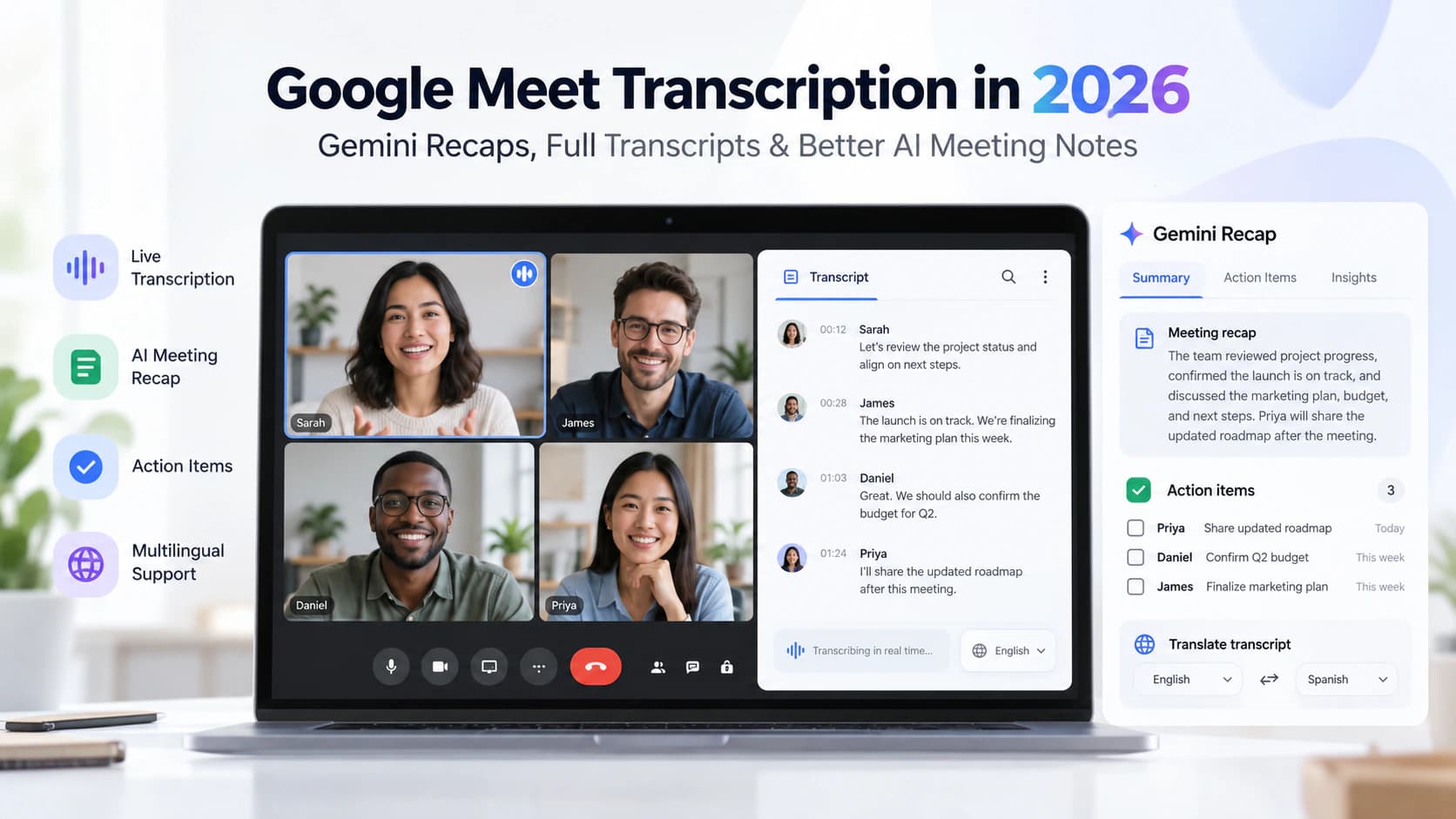
When three people contribute to the same meeting, a text transcript answers only half the question. It may tell you what was said, but can it reliably tell you who said it and when?
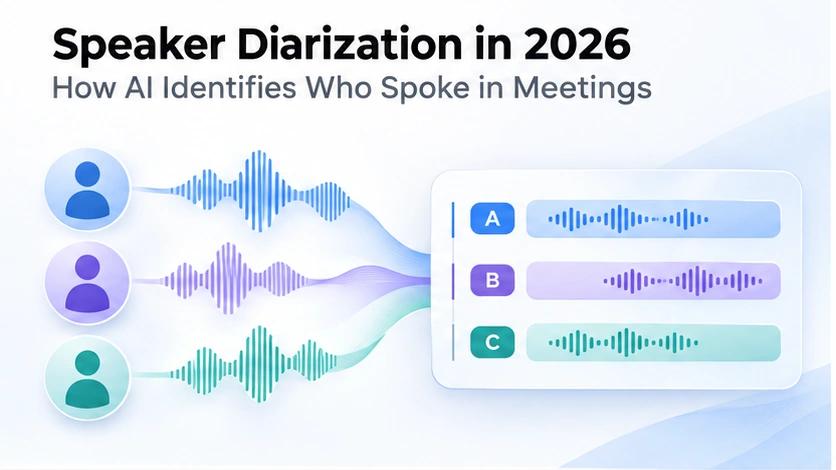
That is the purpose of speaker diarization: identifying intervals of speech and grouping those intervals by speaker.
A speaker-diarized transcript might show Speaker 1 proposing a launch date, Speaker 2 raising a concern, and Speaker 3 agreeing to the next action. Those labels are usually anonymous. They do not necessarily mean that software has authenticated anyone’s real-world identity.
The distinction matters for team meetings, research interviews, podcasts, call reviews and recorded classes. A misassigned statement can change the apparent owner of a commitment or make an interview quotation misleading. Good diarization is therefore useful, but the output still needs careful review when accuracy matters.
This guide explains the underlying process in accessible terms, shows a realistic invented example, compares current implementation options, discusses overlap and evaluation metrics, and walks through creating and checking a speaker-labeled transcript with SpeechYou. We have not run an independent benchmark of these products; vendor features and published benchmark results are identified as such.
What is speaker diarization?
Speaker diarization is the process of determining which speaker is active during each portion of an audio recording. In practical terms, the system creates a timeline of speaker turns: speaker A from one time to another, speaker B next, and perhaps both during an interruption.
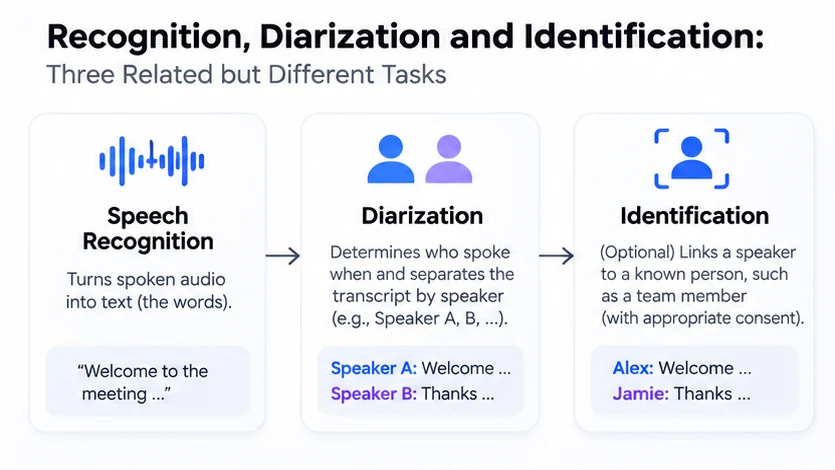
Diarization often appears alongside automatic speech recognition (ASR). ASR identifies spoken words; diarization labels which speaker likely uttered each segment. The two outputs can be aligned to generate a transcript such as:
00:00–00:06 — Speaker A: Let’s finalize the release plan before Friday.
00:06–00:11 — Speaker B: I can own the documentation and captions.
00:11–00:15 — Speaker C: I’ll review the customer email.
00:15–00:19 — Speaker A: Great. We’ll check progress tomorrow.
This is an invented teaching example, not a transcript from a SpeechYou customer or a tested recording. It illustrates labels and timing rather than claiming a particular model will produce these exact boundaries.
In a short conversation with distinct voices, speaker grouping may be relatively straightforward. The task becomes harder with interruptions, cross-talk, distant microphones, similar voices, noisy rooms, brief acknowledgments, language switching or a new participant entering halfway through the recording.
An important point: diarization typically answers which distinct voice spoke, not what is that person’s name. A speaker named “Speaker 2” remains an inferred voice cluster until someone has reliable contextual information to map that cluster to a named participant.
Speaker diarization vs transcription vs speaker identification
Related functions are frequently conflated in product descriptions:
Scroll horizontally to compare all columns.
| Function | Core question | Typical output | Main limitation |
|---|---|---|---|
| Automatic speech recognition | What words were spoken? | “Please send the report.” | Words can be wrong even when speaker boundaries are right. |
| Speaker diarization | Which voice spoke when? | Speaker B, 01:14–01:19 | The label may be swapped, merged or split. |
| Speaker identification | Who is that person? | “Alex” rather than “Speaker B” | Requires trustworthy reference information and appropriate authorization. |
| Speech activity detection | Where is speech present? | Speech between 00:04 and 00:09 | Does not identify words or speaker identity. |
These may be components of one application, but they are not the same operation. An audio clip can be transcribed accurately and diarized badly. It can also receive accurate speaker clusters with a wrong name attached afterward.
Does diarization use voice recognition?
Often it uses machine-learned acoustic representations of a speaker’s voice. These representations can help group distant segments that appear to originate from the same person. But clustering voice characteristics is not the same as verifying an individual’s identity. A label alone is not proof that a particular person was present.
Some systems support enrollment or reference clips for matching known speakers. Those functions add privacy, consent and error considerations. If you only need readable meeting notes, anonymous Speaker A / B / C labels plus human review may be enough.
Is speaker diarization the same as subtitles?
No. A subtitle file such as SRT or VTT primarily stores caption text and display timing. Depending on the export format and application, it may not preserve the complete speaker-cluster structure. A JSON-style transcript may expose speaker and timing metadata more explicitly. Check the actual exported file rather than assuming every format contains the same fields.
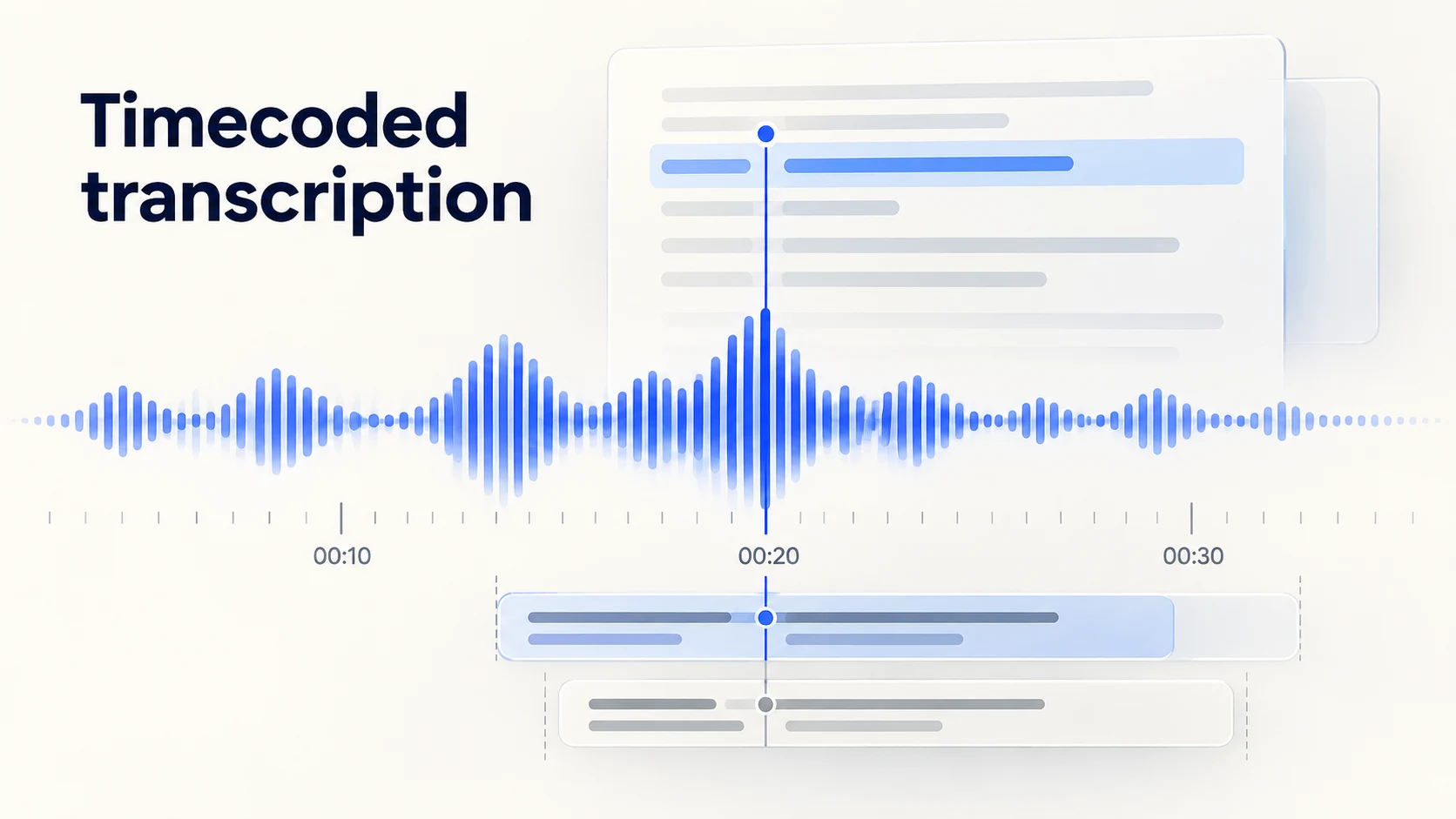
For caption timing and format details, read SpeechYou’s timecoded transcription guide, SRT generator and VTT generator.
How speaker diarization works, step by step
The exact architecture varies. Some systems use separate speech detection, speaker embeddings and clustering. Others use integrated speech-to-text and diarization models. The sequence below describes a useful conceptual pipeline, not a claim that every commercial system internally implements identical stages.
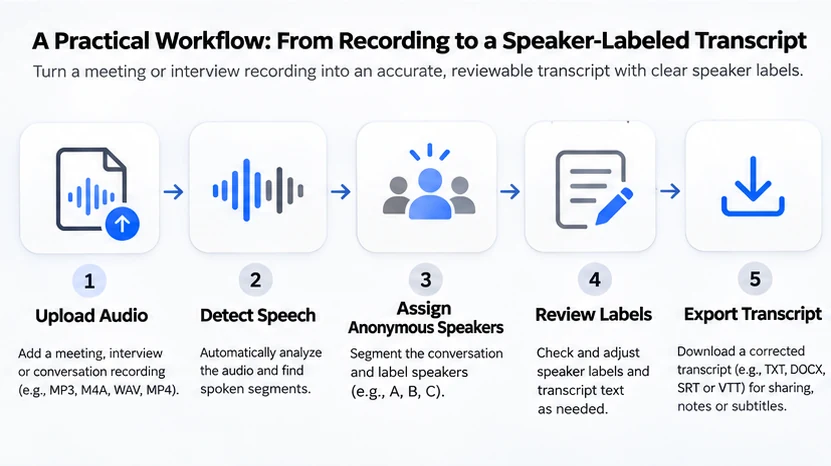
1. Prepare the recording
The recording might come from a conference platform, phone, interview recorder, podcast studio or uploaded video. Sampling rates, channels, loudness and noise vary. Some pipelines convert the recording into a supported signal format; others process multiple channels separately when available.
For a meeting with remote participants, isolated audio channels or clean headset recordings can make review easier than an echoing room microphone. However, converting a bad recording to a higher sample rate will not restore lost speech information.
2. Detect speech regions
Voice activity detection attempts to determine where speech begins and ends. The system distinguishes speech from pauses and sometimes from noise. Errors here propagate: a quietly spoken “yes” may be missed, while background media may be classified as speech.
3. Detect turns and extract speaker information
The system examines acoustic cues that help characterize speakers, and estimates whether a turn belongs to an existing speaker or a new one. Some approaches extract embeddings for speech intervals and compare them; others predict speaker assignments more directly.
The process is not a biometric identity guarantee. Pitch, speaking style, distance to the microphone and emotional state may vary even within one person. Meanwhile two people can have similar voice characteristics.
4. Group segments by speaker
Clustering associates segments with anonymous speakers. For example, segments at 00:05, 02:31 and 19:44 may all be assigned to Speaker A. The system may need to estimate how many speakers are present, and this estimate can be wrong. Providing an expected speaker count, where the tool supports it, can help some workflows but should not be forced when attendance is uncertain.
5. Align the speaker turns with recognized words
Speech recognition produces words or text segments, while diarization provides speaker intervals. The application combines them to make a speaker-labeled transcript. Alignment is especially difficult when two people talk simultaneously or a spoken word straddles a predicted boundary.
The open-source pyannote Community-1 documentation describes an additional exclusive diarization output alongside regular diarization, intended to simplify alignment with transcription timestamps. Exclusive output can be operationally useful, but a single active-speaker track can simplify away genuine simultaneous speech; it should not be treated as proof there was no overlap.
6. Review speaker assignments and export
A reviewer listens at every unexpected change, maps anonymous labels to verified names if needed, corrects misattributions and decides which export format serves the downstream task. For consequential interviews, the original recording should remain the source of truth.
Example: a meeting with interruptions and overlap
Consider a fictional product-planning meeting with three participants: Alex, Jamie and Taylor. A diarization model initially sees them as A, B and C. It may produce the following simplified sequence:
Scroll horizontally to compare all columns.
| Approximate time | Speaker | Invented utterance | Review note |
|---|---|---|---|
| 00:00–00:08 | A | “We need the launch checklist today.” | First clear turn. |
| 00:08–00:14 | B | “I’ve drafted the checklist.” | Distinct voice. |
| 00:12–00:15 | A | “Including the accessibility checks?” | Overlaps B. |
| 00:15–00:22 | C | “I’ll check subtitles this afternoon.” | New speaker introduced. |
| 00:22–00:24 | B | “Great.” | Very short turn. |
| 00:24–00:29 | A | “We’ll review together tomorrow.” | Speaker returns. |
The example contains a real conceptual complication: from 00:12 to 00:14, two people speak at once. A basic transcript may assign both utterances to one person, omit the interruption, or serialize the speech into a misleading order. A speaker-turn model that supports overlapping labels can represent both speakers as active in the same interval, but correct word-level overlap still requires speech recognition capable of resolving both voices.
This is why “supports diarization” should not be interpreted as “perfectly transcribes overlapping conversations.” Ask whether the tool preserves concurrent speaker activity, how it exports that information and whether reviewers can listen back to the source.
What makes speaker diarization difficult?
Overlapping speech and interruptions
Two people may start speaking together, complete each other’s sentences or interrupt mid-word. Overlap is one of the most demanding cases because diarization must determine multiple active speakers and the transcription engine may need to separate competing words. A tool that outputs one speaker per timestamp may be easier to read but less faithful to simultaneous speech.
Similar voices and speaker changes
Related speakers, people with similar pitch or speaking style, and changes in microphone position can confuse clustering. A single person speaking softly in one room and loudly on a phone may be incorrectly split into two labels. Conversely, two similar speakers may be merged. Neither failure should be interpreted as an identity judgment.
Short replies
A one-syllable response such as “yes” may offer too little acoustic context to confidently classify a speaker. If the speaker is not obvious, the responsible editorial choice is to check the audio or retain an uncertain label, not invent a name.
Noise, echo and distance
Room acoustics, keyboard noise, music and compression artifacts can obscure speaker changes. Meetings captured through one distant laptop microphone are particularly vulnerable to uneven volume. Re-recording cleanly, when possible, generally matters more than aggressively applying denoising without listening for artifacts.
Code-switching and multilingual recordings
Switching languages can alter pronunciation, pace and vocal patterns. The transcription model’s language coverage and the diarization model’s speaker grouping are related but separate capabilities. A product advertising many transcription languages does not necessarily demonstrate identical diarization accuracy for every language and dialect.
Unknown number of speakers
It may be difficult to decide whether a quiet background participant, voice played through a speaker, or brief interviewer acknowledgment counts as a distinct speaker. Some tools let you specify a speaker count or range; others estimate it automatically. Review the count before relying on downstream meeting statistics or quote attribution.
How is diarization accuracy measured?
The widely used metric is diarization error rate (DER). The pyannote.metrics documentation describes it in terms of false-alarm speech, missed speech and speaker confusion, divided by reference speaker time:
DER = (false alarm + missed speech + speaker confusion) / total reference speaker time
Lower DER is generally better under the same evaluation configuration. However, there is no meaningful universal “speaker diarization accuracy percentage” that applies to every recording, language and acoustic setting. A benchmark result on a clean corpus cannot be assumed to predict a noisy customer-support call.
Evaluation choices matter: whether overlapping speech counts, whether a tolerance collar is applied around speaker boundaries, what constitutes a speaker and which reference annotations are used. Two published numbers from different protocols should not be compared casually.
For context, the pyannote project publishes benchmark DER values for Community-1 and premium models across datasets such as AMI, DIHARD and VoxConverse. Those are vendor-reported benchmark measurements on specified datasets, not a test of SpeechYou and not a universal ranking of all transcription tools. Consult the project’s benchmark tables and methods before drawing conclusions.
Also remember word error rate (WER) evaluates recognition of words rather than speaker grouping. A low WER and a low DER represent different successes. For a business meeting, it is possible to achieve clear words but incorrectly attribute the resulting action item to the wrong participant.
Practical review criteria beyond one score
For real users, assess whether the transcript retains speaker labels consistently over a long recording, handles participants returning after long silence, represents or flags overlap, supports playback around questionable boundaries, and exports sufficient metadata for the intended use.
In a legal, medical, investigative or HR context, the standard of review may be much higher. Automated diarization should not be used as the sole evidence of who made a consequential statement.
Speaker diarization tools in 2026: what to compare
There are two broad purchasing paths: a ready-to-use transcription application or a developer-oriented diarization pipeline. The following table compares documented capabilities and fit, not measured head-to-head accuracy.
Scroll horizontally to compare all columns.
| Option | Approach | Good fit | Important qualification |
|---|---|---|---|
| SpeechYou | Transcription application with optional speaker diarization documented for MultiLingual Pro | Meetings, interviews and files that need readable transcripts, AI summaries and exports | Speaker labels are anonymous; availability should be confirmed for the selected processing option and plan. |
| pyannote.audio Community-1 | Open-source Python speaker diarization pipeline | Developers who control their processing environment | Requires setup and model access; diarization alone does not produce a complete ASR transcript. |
| pyannoteAI managed / premium models | Commercial speaker-focused diarization models | Teams wanting a model in a production stack | Published benchmark values are dataset-specific; pricing and deployment terms require verification. |
| OpenAI audio transcription API | Hosted transcription models, with a legacy diarization-specific option | Developers using OpenAI’s API | The gpt-4o-transcribe-diarize model is deprecated with a documented February 26, 2027 shutdown. |
The correct choice depends less on an abstract “best AI” label than on your actual requirements: a finished document, an API response, local processing, long-form speaker consistency, export formats, multilingual performance, privacy constraints and ongoing maintenance.
SpeechYou: a complete workflow for end users
SpeechYou’s MultiLingual Pro guide explicitly describes optional speaker diarization. The public homepage shows speaker-labeled example transcripts and documents browser recording, audio/video uploads, AI summaries and TXT, SRT, VTT and JSON export options. Its current pricing page
This makes it a sensible option for someone who needs a readable, reviewable result rather than Python model orchestration. Do not assume every language, model selection or file type has equally accurate diarization. Check the feature in your own representative recording, and inspect how speaker data survives the chosen export.
pyannote: building or evaluating a diarization pipeline
The pyannote ecosystem focuses directly on segmentation, speaker changes, embeddings, overlap and diarization. The Community-1 documentation provides an example setup using Python, access conditions and Hugging Face authentication, and describes offline use after obtaining the required models.
A developer can combine a diarization pipeline with their chosen ASR engine and align the outputs. This offers control and flexibility, but adds operational responsibility: model downloads, dependency management, GPU or CPU costs, speaker-boundary reconciliation, monitoring and data handling.
A recent line of premium pyannote models reports additional benchmark improvements. Treat that as model-provider evidence, not a promise that every customer recording will show the same gain.
OpenAI: API transcription and a legacy speaker-labeling model
OpenAI’s file transcription documentation describes gpt-transcribe as its recommended general recorded-speech model. Its diarization-specific gpt-4o-transcribe-diarize model can return diarized_json with segment-level speaker, start and end information for existing integrations.
Important as of November 2026: OpenAI’s deprecation notice marks gpt-4o-transcribe-diarize as deprecated and lists a shutdown date of February 26, 2027. The documentation also states that diarization with that model is for file transcription rather than Realtime transcription sessions. New production architecture should account for these published limitations and recheck the current API options before implementation.
These options differ fundamentally. A hosted ASR model with speaker-labeled JSON is not equivalent to a locally operated, separately configurable diarization pipeline. And neither automatically provides the editing, summaries, access control and output workflow of a complete end-user application.
How to create and review a speaker-labeled transcript with SpeechYou
This workflow is based on publicly documented capabilities. Interface labels, the availability of a particular model and processing controls may vary by account or deployment; do not interpret the steps as a screenshot-tested walkthrough.
Step 1: Start with an authorized recording
Use an audio or video file you have permission to record and process. SpeechYou advertises both uploads and a browser recorder; its browser meeting mode is documented for capturing microphone and system audio for supported meeting scenarios. Respect participant notice requirements and workplace policies.
Choose the original or final edited source recording rather than a clip with a mismatched timeline. Keep the source file for audit and correction purposes.
Step 2: Choose the correct transcription language or model
SpeechYou offers Whisper and MultiLingual Pro pathways and advertises transcription across approximately 1,700 languages, with coverage varying by language and dialect. Its MultiLingual Pro guide specifically notes optional speaker diarization; the application also supports it in the Whisper workflow. Check that Identify speakers is enabled before processing if your workflow requires separation.
If the recording’s language is known, selecting it may be preferable to relying on automatic detection for short or ambiguous audio. Confirm the resulting text rather than assuming that a supported language name implies perfect recognition.
Step 3: Process and inspect the result
After transcription, look for the anonymous speaker labels and timestamps in the transcript view. Count the apparent speakers against what you know about the meeting. Listen at the first appearance of each label and whenever a voice returns after a long gap. A model may split one person into two labels or merge two people into one.
If the application permits renaming labels, use names only after confirming which participant matches each voice. When uncertain, leave the anonymous label or mark it for later review.
Step 4: Review the highest-risk passages
Review interruptions, brief responses, similar-sounding participants, quiet comments, proper nouns, dates, amounts, assignments and decisions. For example, confusing “I’ll send it” between two speakers is more consequential than mislabeling a casual greeting.
Maintain a distinction between a verbatim transcript and an AI-generated summary. A summary can surface the major decisions, but cannot substitute for checking whether a particular speaker actually made a statement.
Step 5: Summarize and export for the destination
SpeechYou’s documented Ask AI capability can generate summaries and action items. Its , including Ask AI and TXT, SRT, VTT and JSON exports. For meeting notes, TXT may be sufficient; for captions, SRT or VTT may be appropriate; for downstream analysis, inspect whether JSON contains the metadata you need.
Do not assume that renaming a speaker in the editor automatically changes every exported format. Inspect the downloaded file and test it in the destination tool. Subtitle files may not retain speaker information in the same structured way as the transcript interface.
Ready to process a multi-speaker recording? Open SpeechYou to upload a file or record a meeting, then review speaker labels and the resulting transcript before sharing it.
Recording tips that improve speaker separation
No recording checklist eliminates diarization errors, but a few practices make correction easier:
- Use a microphone arrangement appropriate to the meeting. Separate microphones or clean meeting-platform audio are often easier to inspect than a single microphone at the back of a noisy room.
- Ask participants to avoid simultaneous speech when practical. Natural conversation has overlap, but long sections of crosstalk make transcript attribution harder.
- Capture a clear first turn from each participant. Early distinct speech can help a reviewer recognize the speaker clusters later.
- Avoid loud playback through an open microphone. Echo and duplicate voices can create confusing segmentation.
- Keep a participant list separately. It helps humans map anonymous labels to people, but do not infer an identity solely because the number of labels matches the attendance list.
- Listen to the final file before processing. Check whether everyone is audible throughout, especially remote participants.
- Review high-impact statements manually. Names, assignments, approvals, instructions and disputed quotations deserve a source-audio check.
For additional recording preparation, see SpeechYou’s meeting audio transcription guide and interview transcription software guide.
Speaker diarization for different use cases
Team meetings and AI meeting notes
Speaker labels make it easier to attribute suggestions, concerns and commitments. A useful workflow is to transcribe, check speakers on key decisions, create a summary, and then verify action owners against the underlying recording. If an organization needs certified attendance or approvals, a diarized transcript should not replace its official record.
Research and qualitative interviews
A two-person research interview typically needs consistent interviewer/participant separation. In a focus group, the number of voices and interruptions grow. Reviewers should also preserve anonymization when research ethics require it; replacing “Speaker A” with a real name may be inappropriate even if a name is known.
Podcasts and panel discussions
Speaker turns help editors identify quotable segments and organize show notes. In panel discussions, overlap is common, so caption production may require a second editorial pass. For making subtitles, export and check the actual timecoded file rather than relying on speaker labels alone.
Sales and support call reviews
Speaker labels can separate an agent and a customer for internal coaching and summaries. If the call contains sensitive information, confirm that recording, transfer, retention and sharing are permitted. Do not use a misattributed automatic label as the sole basis for personnel or customer decisions.
Lectures and classroom discussion
For a lecture with occasional student questions, diarization may help distinguish the instructor from participants. The goal is often navigation and note-taking, not the real-world identification of every student. The recording quality and institutional rules are particularly important.
Privacy, consent and responsible use
Voice recordings can contain personal information and sensitive business details. A diarized transcript may also make statements attributable to individuals who did not expect a machine-generated record to be distributed. Before recording and processing, establish a lawful basis and follow relevant notice, consent, retention and access-control requirements.
If a project involves sensitive interviews, check what happens to uploaded data, who can access recordings and transcripts, and whether the chosen processing environment meets your organizational requirements. Avoid identifying anonymous speakers by name unless necessary and appropriately authorized. A generic “Speaker B” label can still be sensitive in context, and a name assigned by an AI should be independently verified.
For disputed or consequential material, preserve the original recording and the history of corrections. Clearly distinguish verbatim wording from edited notes, inferred labels and generated summaries.
Frequently asked questions
What is the difference between speaker diarization and speaker recognition?
Diarization groups audio turns according to which distinct voice appears to be speaking. Speaker recognition or identification may attempt to match a voice to a known person. Diarization labels are often anonymous and are not identity verification.
Can speaker diarization detect three or more people?
Yes, systems can attempt to separate multi-speaker recordings, though actual speaker-count reliability varies. More speakers, shorter turns and overlapping conversations make the task harder. Review the number and consistency of labels.
Does Whisper automatically identify speakers?
Do not assume ordinary Whisper text transcription automatically supplies dependable diarization labels. Speaker separation is often implemented using a separate pipeline or a specialized diarization-capable model. Verify the specific model and response format rather than relying on the product name.
How accurate is AI speaker diarization?
There is no universal percentage. Accuracy depends on recording conditions, overlap, voices, languages and evaluation methodology. DER is a common measure, but benchmark results are only comparable when dataset and scoring rules match.
Can diarization identify speakers by their names?
Usually it assigns labels such as Speaker A or Speaker B. Mapping them to names requires trustworthy context, enrollment data or human review; a name should not be inferred merely from the acoustic cluster.
Can diarization handle people speaking at the same time?
Some pipelines represent overlapping activity, but many output formats simplify it. Even if the diarization detects two active speakers, speech recognition may struggle to recover both utterances. Review overlaps manually.
Is speaker diarization useful for SRT subtitles?
Yes, speaker-turn information can help an editor attribute dialogue, but SRT and VTT focus primarily on timed text cues. Verify how your exporter handles labels; for accessibility, follow the destination platform’s conventions for identifying speakers when necessary.
Is SpeechYou’s speaker diarization always enabled?
SpeechYou’s MultiLingual Pro documentation describes diarization as optional. Availability and settings may vary with the chosen workflow; check the relevant option before processing and review the result. Do not assume every transcription has automatic speaker separation.
What is DER in speaker diarization?
Diarization error rate measures missed speech, false-alarm speech and speaker confusion relative to annotated reference speech time. Lower is generally better within the same benchmark protocol, but the number alone does not measure transcription accuracy.
What should I do if the same speaker receives two labels?
Replay the relevant segments and verify that they are the same person. If your editor supports corrections, consolidate the assignments there; otherwise keep a reviewed mapping or correct the downstream document. Do not rename labels without listening.
Final takeaway
Speaker diarization answers an essential question that raw speech-to-text leaves open: which voice contributed each part of a conversation? It makes transcripts more useful for meetings, interviews, podcasts and research, but its labels can be wrong, especially where speakers overlap or sound alike. The strongest workflow pairs automated speaker grouping with targeted human review, useful timestamps and appropriate exports.
If you want a transcript-first workflow rather than a custom Python pipeline, try SpeechYou. For multi-speaker recordings, check the optional diarization setting, verify important speaker assignments and choose the export your next task actually needs.
Sources and editorial methodology
Reviewed November 9, 2026. The article draws from product documentation and technical primary sources. Examples are fictional and diagrams are illustrations, not screenshots or test results. No independent model-quality test was performed.
- SpeechYou MultiLingual Pro documentation — optional diarization and language considerations.
- SpeechYou homepage — recorder, transcription, example speaker labels, Ask AI and exports.
- SpeechYou pricing — published plan features and export availability; subject to change.
- pyannote Community-1 documentation — pipeline, installation, overlap and evaluation information.
- pyannote.audio repository and benchmarks — open-source diarization options and published dataset results.
- pyannote.metrics reference — definition of DER.
- OpenAI file transcription documentation — current and deprecated transcription workflows, diarized JSON and published shutdown schedule.
- SpeechYou timecoded transcription — timestamps and file-format choices.