
Oral-history interviews
Keep local vocabulary and uncertain names traceable to the source recording.
Prepare a transcript draft from Carpathian Romani (Cyrillic script) audio or video, then review the text alongside your recording.
An account is required. Choose your file in the app after signing up or signing in.
Continue to Speechyou to upload your Romani audio or video.
or drop a file here
MP3, WAV, M4A, MP4 and more
Continue to signup. Your file stays on your device; choose it again in the app after creating your account.
No file is uploaded on this page.
Work with your recording after transcription: review the text, find the passage you need and prepare it for the next step.
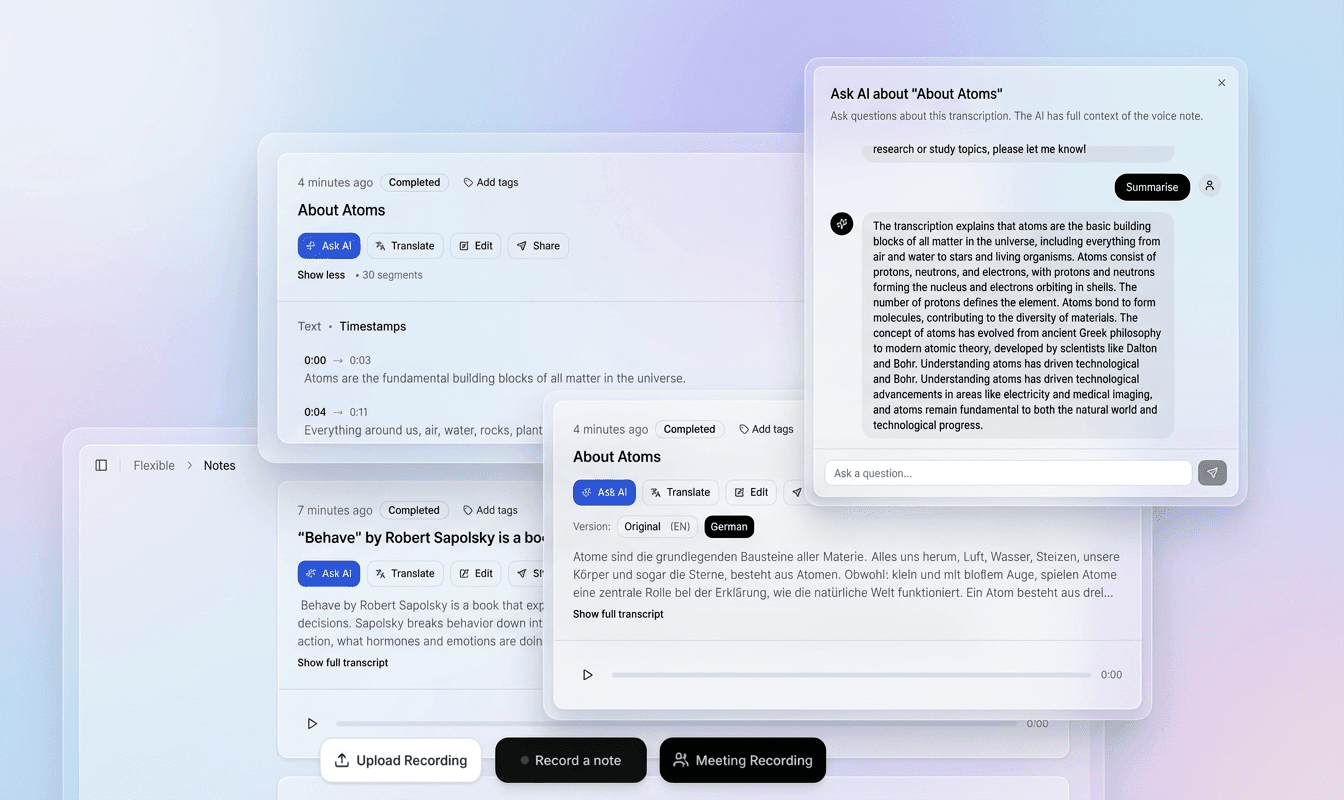
Use the recording and timestamped text together to check names, unfamiliar words and speaker changes in context.
Correct the transcript in the editor, refine segments and prepare a version that fits your document or video.
Export plain text, structured data or subtitle files. Use the transcript for notes, research, captions and follow-up work.
Choose a file above to continue to signup. Your recording stays on your device at this step.
In the app, choose your file again, select its spoken language and model, then start transcription.
Check the draft against your recording, correct the text and timing, then export the format you need.
Regional speech and spelling conventions matter. Identify the variety in your recording and check an excerpt before committing a larger project.
Choose the Romani variety and writing system used by your speakers. Romani is distinct from Romanian; keep that distinction clear throughout review. For Carpathian Romani (Cyrillic script) recordings, keep the variety and writing convention in your project notes.
Results depend on the recording, selected model and language variety. Review names, specialist terms and unclear passages before sharing or publishing.
Use Carpathian, Sinte or Vlax labels only when they fit the recording, and check local vocabulary with the speaker.
Check Cyrillic or Latin text, personal names and spelling against the project’s chosen convention.
Review language-specific Cyrillic letters and names. Check for Latin characters accidentally mixed into Cyrillic words when editing or copying text.
What to listen for when reviewing the first draft.
Decide the final writing convention before editing a series of recordings.
Review unfamiliar sounds and word boundaries in their sentence context rather than guessing from spelling.
Preserve the language spoken and keep translation separate from transcription.
Practical ways to turn a recording into material you can search, edit and reuse.
Keep local vocabulary and uncertain names traceable to the source recording.
Review Cyrillic wording before adjusting subtitle lines and checking display in the film.
Prepare a checked text that follows the project’s agreed writing convention.
Agree whether pauses, repetitions and local forms should remain in the reviewed record.
After transcription and review in the app, choose the output that fits your next step.
Carpathian Romani recordings may form part of an oral-history collection, a community film, a classroom project or a linguistic interview. The name provides useful context, but a good transcript also needs the speaker’s own variety and the writing convention chosen by the project. This page concerns Cyrillic text; the related Latin-script page offers a different route for projects with different written requirements.
The source recording should remain the reference throughout the work. Keep available speaker and locality information with it, particularly when collecting interviews from different communities. A recording made in one country is not necessarily representative of every variety used there. Local vocabulary and family names often need a reviewer who knows the speakers or their community.
Interviews can include Romani alongside Slovak, Hungarian, Ukrainian or another language. Preserve the language actually spoken instead of silently translating the whole recording into one written language. A borrowed word may be part of the speaker’s normal vocabulary, while a longer quotation may follow the spelling convention of another language. Listen in context before deciding how to edit it.
The original material may be described with labels such as East Slovak or Central Romani. Retain a meaningful label supplied by the speaker or research project, but do not invent a more precise classification from the page name. A broad label helps discovery; the project notes explain the particular recording.
Before reviewing a long file, decide which Cyrillic spelling convention the final text requires. Check how personal names, place names and language-specific sounds should be represented. Where a project uses both Cyrillic and Latin versions, keep a clear relationship between them and review transliteration separately. A script change alone does not verify that the same spoken wording has been preserved.
Manual copying can introduce Latin characters that resemble Cyrillic ones. Check these in ordinary words, while retaining intentional Latin names where the project needs them. Exported text should also be reviewed in the actual caption player or document. A clean display inside an editor does not replace that final destination check.
Aspirated consonants, local pronunciation and natural connected speech can make a passage difficult to check word by word. Use the surrounding sentence and the original audio rather than choosing an unfamiliar form solely because it resembles a familiar spelling. Avoid unsupported examples of supposedly equivalent words from different varieties.
For research, decide whether the transcript needs pauses, interruptions and nonstandard forms. For a community publication, prepare a readable adaptation after reviewing the source text. Those two outputs can be useful together, but they should not be presented as the same kind of record.
An oral-history project can use a reviewed transcript to identify names, themes and passages for later editing. A teaching project may prepare a dialogue that learners read while listening. A documentary can turn reviewed wording into captions, with line breaks and reading time checked against the film. Song lyrics and heavily overlapping speech deserve their own listening pass rather than assumptions drawn from a conversational sample.
Create an account or sign in before choosing the recording in Speechyou. Work through the draft in the editor, check names and language changes, then export TXT, SRT, VTT or JSON as appropriate. SRT and VTT serve caption workflows; TXT provides a simpler text reference. Keep the recording and the reviewed transcript together so future editors can return to the source when a word or quotation is questioned.
Practical details before you start.
This page concerns Cyrillic text. Choose the writing system required by your project and check the actual output; a separate page does not establish a performance comparison.
Ordinary written text does not record every sound or pause. Define a research annotation convention and check it against the audio.
Use project references or the speaker’s intended spelling, and record the decision consistently in the reviewed text.
Speechyou provides TXT, SRT, VTT and JSON exports. Review the transcript and check its script in the intended destination before using it.
No. Romani and Romanian are different languages. Choose the Romani variety and script that match the recording; use the Romanian page for Romanian speech.
Review the cyrillic script text and check that it matches your project’s writing convention. Any transliteration or translation should be an explicit editing task; the page name alone is not a guarantee of automatic conversion.
No. Choosing or dropping a file takes you to signup. The landing page does not upload, store or transcribe it. After creating your account, select the file again in the app and choose the spoken language and model.
The app accepts MP3, WAV, AAC, OGG, FLAC and M4A audio, plus MP4, WEBM, MOV, M4V and MPEG/MPG video. The free trial and Solo support files up to 10 GB each. You can extract or trim a short section first to evaluate the result.
In the app, review and edit the transcript before exporting. Use TXT for plain text, SRT for video editors and YouTube, VTT for web captions, or JSON for structured data. Check subtitle timing and line breaks against the original video before publishing.
Create an account to transcribe in the app. Solo includes uploads up to 10 GB per file and $15/month or $67/year billing.
Full access with monthly billing.
Choose the language and writing system that match your recording.
Create your account, upload your file in the app and turn your audio into a transcript you can review.